
Shopify Checkout Trust Badges: What Actually Works in 2026 (And What Hurts)
The honest guide to Shopify checkout trust badges. Which ones lift conversion, which ones hurt it, where to place them, and how to add them on Shopify Standard, Advanced, and Plus.
In this article
- 01 Do trust badges still work in 2026?#
- 02 Which badges actually move conversion?#
- 03 Which badges hurt conversion?#
- 04 Where do trust badges actually belong on a Shopify checkout?#
- 05 Specific copy and badge recommendations#
- 06 How to add trust badges on Shopify (Standard, Advanced, Plus)#
- 07 Trust signals that aren’t badges#
- 08 A short summary#
Trust badges are one of the most-debated and least-rigorously-tested elements in Shopify checkout. The conventional wisdom (“add SSL badges, conversion goes up”) was true in 2014 and is only partially true in 2026. Some badges still help, some are neutral, and a small number actively hurt.
This post is the honest, data-backed guide to Shopify checkout trust badges in 2026: what to use, where to place them, and the badges to skip. The broader optimization context is in the Shopify checkout optimization guide.
Do trust badges still work in 2026?
Short answer: yes, but only on stores with low brand recognition, and only for specific badge types in specific placements.
The mechanic hasn’t changed. When a shopper enters their card number on a site they don’t already trust, the brain runs a fast risk calculation. Visual signals that the site is secure, legitimate, and reputable reduce that perceived risk and lift completion 1-4 percentage points.
What’s changed is the baseline. Shop Pay, Apple Pay, Google Pay, and Shopify’s own checkout brand recognition have raised the floor. Shoppers who recognize “powered by Shopify” or who default to express payments don’t need additional trust signals. The store-level brand recognition matters far more than it used to.
The expected lift from adding trust badges to a Shopify checkout, by store maturity:
- Brand-new store (under 6 months, low traffic): 2-5 point lift
- Established but niche store: 1-3 point lift
- Well-known DTC brand: 0-1 point lift
- Top 100 Shopify store: flat or slightly negative
The negative case at the top is real: when shoppers already trust your brand, plastering security badges around the payment button reads as defensive and can subtly increase perceived risk. The “thou doth protest too much” effect.
Which badges actually move conversion?
Across A/B tests we’ve reviewed and run on Shopify stores in 2024-2025:
| Badge type | Typical lift | Notes |
|---|---|---|
| SSL / “Secure checkout” | +1.0-2.5% | Most effective on new stores. Near-zero on established brands. |
| Money-back guarantee | +1.5-3.5% | The highest-leverage “trust” badge. Works on all store sizes. |
| Free returns | +0.8-2.2% | Apparel and shoes especially. |
| Verified by Visa, Mastercard SecureCode | +0.3-1.0% | Diminishing returns. Most shoppers ignore. |
| Norton or McAfee Secured | +0.4-1.5% | Older demographics over-index on these. |
| BBB Accredited | +0.3-1.2% | US-only. Works on health and supplements. |
| TRUSTe / TrustArc | +0.0-0.8% | Mostly neutral in 2026. |
| Custom “100% Satisfaction” | +0.8-2.0% | Works if the language is specific. |
| ”30-day no-questions returns” | +1.2-3.0% | Specificity is the magic. Vague guarantees underperform. |
| Social proof (“10,000+ happy customers”) | +0.5-1.8% | Only if the number is real and verifiable. |
The standout: specific guarantees beat generic security badges almost every time. “30-day no-questions returns” outperforms an SSL badge by 2-3x on most A/B tests we’ve seen. Shoppers care about what happens if it goes wrong, not about cryptographic security in the abstract.
Which badges hurt conversion?
A short list of badges that consistently produce negative or net-zero results:
- Outdated PCI badges (the 2010-era ones with garish gradients and
verified.pngfilenames). They scream “this site hasn’t been touched since 2014” and increase perceived risk. - Too many badges in a cluster. More than 4-5 badges in a single area becomes visual clutter and reads as anxious. We’ve seen 3-5 point drops from over-badging.
- Fake-looking certification logos. Custom-designed badges that mimic real certifications without actually being certified. Shoppers spot these and trust drops.
- Badges placed mid-form. Trust badges between form fields interrupt the input rhythm and slow completion. They belong outside the form flow, not inside it.
Bad placement undoes good selection. We’ve seen stores with the right badges (SSL plus money-back guarantee) lose 2 points of completion because the badges were placed mid-form instead of near the place-order button.
Where do trust badges actually belong on a Shopify checkout?
Three placements work in 2026:
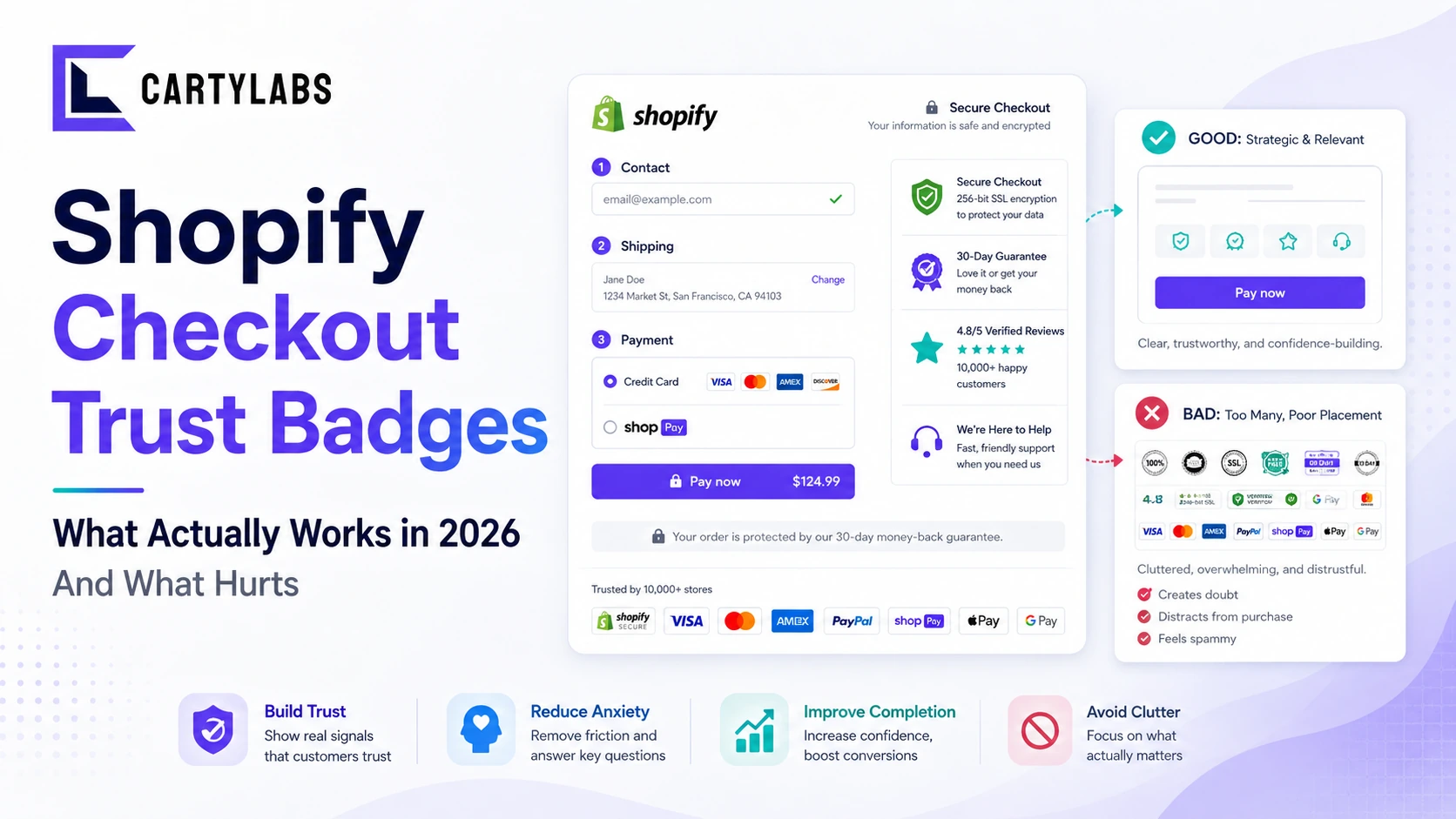
- Directly adjacent to the place-order button. The highest-leverage placement. The moment of card entry and place-order click is when risk perception peaks. A money-back guarantee line or SSL note 12-24 pixels from the button captures the most attention.
- In the order summary panel. A small “Secure checkout” or “Free returns” line in the order summary (the panel showing the cart contents on the right) is unobtrusive and effective.
- In the footer of every checkout page. Less impactful, but doesn’t hurt, and reinforces consistency across the flow.
The placement to avoid: floating above the form fields, especially above the email field at the top of checkout. It’s the most common bad placement and it reads as defensive. The badges should appear when they’re relevant (at payment), not at the start of the form.
For the in-cart-drawer version of this question (trust signals before checkout starts), see our Shopify cart drawer guide.
Specific copy and badge recommendations
If we had to recommend a single “trust kit” for a typical Shopify store, it would be:
- Above the place-order button: a one-line guarantee in plain text. “30-day money-back guarantee. Free returns.” with a small green checkmark icon.
- In the order summary: a “Secure checkout via Shopify Pay” or “SSL secured” line with the appropriate icon.
- In the checkout footer: payment method logos (Visa, Mastercard, Amex, Discover, Shop Pay, Apple Pay, Google Pay).
That’s it. Three placements, three different message types (guarantee, security, payment options). Don’t add more.
The exact copy matters. Specifics outperform generics:
- ✅ “30-day no-questions returns” → high trust
- ❌ “Satisfaction guaranteed” → vague, low trust
- ✅ “Free returns. Pre-paid label included.” → specific, actionable
- ❌ “Easy returns” → too vague
- ✅ “Secure checkout via Shopify Pay (PCI-DSS compliant)” → believable
- ❌ “100% Secure” with no explanation → reads as defensive
Plain text plus a small icon almost always outperforms a gaudy badge image. The badge image was the right answer in 2010. The clean inline-text-with-icon is the right answer now.
How to add trust badges on Shopify (Standard, Advanced, Plus)
The implementation varies by tier.
Shopify Standard and Advanced:
- Cart drawer or cart page badges: theme settings or via a cart app with built-in trust badge slots (Cartylabs ships these as configurable blocks).
- Checkout badges: Checkout UI Extensions (the modern, supported way) or a trust badge app from the App Store that wraps Extensibility under the hood.
- What you can’t do: edit
checkout.liquiddirectly. That surface was deprecated in 2024. Anyone telling you to “just paste this HTML into checkout.liquid” is giving 2019 advice.
Shopify Plus:
- Same Checkout UI Extensions surface plus deeper Branding API control.
- Custom checkout domains and the Plus-specific Branding API let you lay out trust badges with more flexibility.
- Plus stores can use Shopify Scripts (still supported) for dynamic badge logic. For example, showing different badges based on cart contents or shopper geography.
The Shopify Checkout Extensibility post goes deeper on the technical surface. Most stores don’t need to write extensions themselves. Pre-built apps ship the common badge configurations.
Trust signals that aren’t badges
Worth knowing: badges are only ~30% of the trust signal stack. The bigger trust levers on a Shopify checkout:
- Visible shipping and return policy summary. A one-line summary inside checkout (“Free returns within 30 days. Ships from California in 1-2 business days.”) moves completion 1-3 points on most stores.
- Inline shipping cost calculation. Knowing the total cost before the payment step is the single largest “trust” lever in checkout. Surprise shipping is the #1 abandonment reason in our checkout abandonment statistics post.
- Express payments at the top. Shop Pay, Apple Pay, and Google Pay are trust signals by association. They tell the shopper “this is a real Shopify store, your payment is handled by a known processor.”
- Order summary clarity. Visible item images, clear line-item totals, no surprise fees. Anything that hides cost erodes trust.
- Real reviews displayed in the order summary panel. A small 4.8/5 rating with a review count, pulled from your actual review platform, lifts trust more than any abstract badge.
A clean checkout with no trust badges and a clear shipping policy outperforms a cluttered checkout with five badges and surprise shipping costs.
A short summary
Trust badges on Shopify checkout in 2026 work, but selectively. Specific guarantees (“30-day no-questions returns”) consistently outperform generic security badges. Placement adjacent to the place-order button captures the most attention. Established brands get less lift than new stores. The top decile of stores often does best with minimal badges and a clean inline guarantee line instead.
Don’t over-badge. Three placements, three message types (guarantee, security, payment options) is plenty. Lead with specific copy, supplement with one or two well-chosen visual badges, and rely on the broader trust stack (shipping clarity, express payments, return policy) for the heavy lifting.
Install Cartylabs free on Shopify. Cart and checkout trust signals shipped pre-configured, 14-day free trial.
Related reading: Shopify checkout optimization guide, Checkout abandonment statistics, Cart drawer guide.
Keep reading
All articles →Guest Checkout vs. Account Creation on Shopify: Which Wins in 2026?
Should you force account creation or offer guest checkout on Shopify? Data-backed comparison of conversion, retention, LTV, and the hybrid post-purchase signup pattern that beats both.
Trust Signals: Making Your Shopify Checkout Look Secure in 2026
Make your Shopify checkout look secure and convert better with the right mix of trust signals, payment logos, security badges, and reassurance copy that quietly closes the sale at the payment step.
Shopify One-Page Checkout: The Ultimate Conversion Booster?
Does Shopify one-page checkout actually beat multi-step in 2026? A data-backed look at conversion gains, mobile trade-offs, and exactly when to switch your store.
 Install Cart — Free