
Checkout Blocks vs Checkout Extensions: What's the Difference, and Which Should You Use?
Checkout Blocks (the Shopify app) vs Checkout UI Extensions (the underlying Shopify platform feature). What each one is, when to use which, and how they fit together in 2026.
In this article
- 01 The 30-second answer#
- 02 Which “Checkout Blocks” do you mean?#
- 03 What are Checkout UI Extensions, exactly?#
- 04 When to use Checkout Blocks (the app)#
- 05 When to use raw Checkout UI Extensions (writing your own)#
- 06 Checkout Blocks vs Cartylabs Checkout Customizer (and other apps)#
- 07 Checkout Blocks vs Functions#
- 08 What about the legacy “checkout.liquid”?#
- 09 Common use cases and where each fits#
- 10 Common confusions to clear up#
- 11 A short summary#
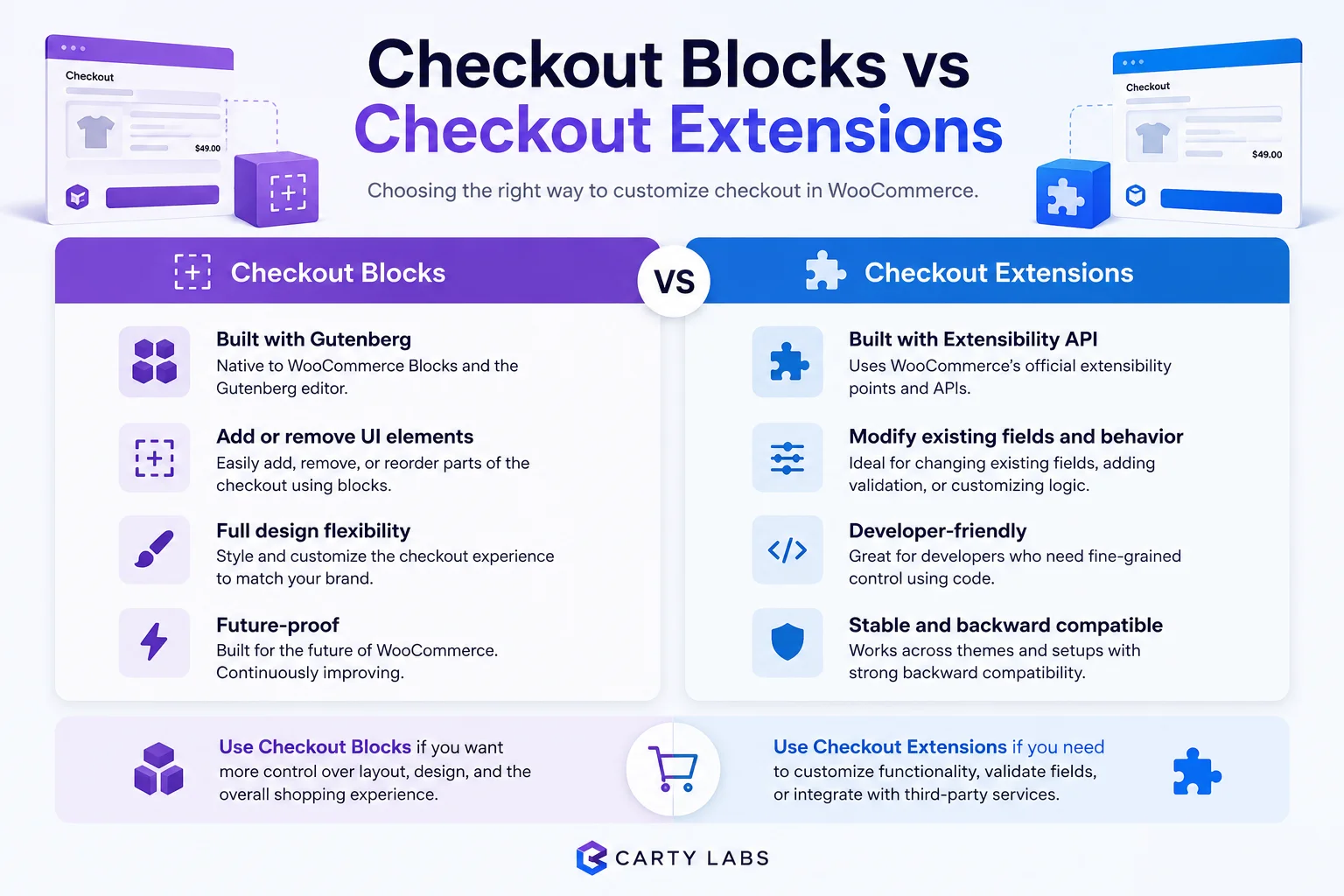
The names are confusingly similar, and merchants regularly ask whether “Checkout Blocks” and “Checkout Extensions” are the same thing, alternatives to each other, or completely separate concepts. The short answer: they’re related but not the same. One is a specific app. The other is the underlying Shopify platform feature.
This post is the clean explainer of Checkout Blocks vs Checkout Extensions in 2026: what each is, when to use which, and how they fit together.
For the broader context on the platform itself, see Shopify Checkout Extensibility explained.
The 30-second answer
- Checkout UI Extensions is Shopify’s official platform feature for customizing checkout. The underlying API. Part of Shopify Checkout Extensibility.
- Checkout Blocks is a specific Shopify app (by Shopify itself or third parties, depending on which “Checkout Blocks” you mean) that wraps Checkout UI Extensions in a block-based UI.
Every “Checkout Blocks” app is built on Checkout UI Extensions. The platform is the API. The app is one (of many) ways to use the API without writing code.
Which “Checkout Blocks” do you mean?
The naming confusion is real because there are at least two products that use the name.
1. Shopify Checkout Blocks (Shopify’s official app)
Shopify launched an official “Checkout Blocks” app in 2023 to let merchants add common customizations to checkout via a block editor: content blocks, custom fields, banners, and the like. It was Shopify’s first-party answer to “how do I add stuff to checkout without writing code?”
Status in 2026: still available, but Shopify has shifted emphasis toward letting third-party apps cover the same surface with deeper functionality. The official Checkout Blocks app is competent but minimal.
2. Third-party apps using “Blocks” branding
Several third-party apps use “block” or “blocks” in their name or marketing: Checkout Plus, Cartylabs Checkout Customizer (block-based UI), and others. These all wrap Checkout UI Extensions with their own editor experience.
The right mental model: “Blocks” is a UI paradigm for non-developers to drag and drop checkout customizations. Multiple apps offer block-style editors on top of the same underlying Extensibility API.
What are Checkout UI Extensions, exactly?
Checkout UI Extensions are Shopify’s React-style component framework for rendering content inside checkout. They run in a sandboxed environment, expose a constrained API for safety, and deploy via Shopify apps installed on a store.
The technical details:
- Language. TypeScript or JavaScript using the
@shopify/ui-extensionslibrary. - Rendering. Preact-like components in a Web Component runtime.
- Extension points. ~30 named slots across cart, checkout, and order status pages (e.g.,
purchase.checkout.block.render,purchase.checkout.cart-line-list.render-after). - Lifecycle. Deployed via Shopify CLI, packaged inside a Shopify app, installed onto stores via the App Store or as custom apps.
For most merchants, you never interact with the API directly. You interact with apps that wrap it, and the block-editor apps are the most common wrapper.
When to use Checkout Blocks (the app)
Worth installing if:
- You need basic in-checkout customizations (banners, custom fields, content blocks) and don’t already have a checkout app.
- You want Shopify’s first-party solution rather than a third-party one.
- You’re early in your Extensibility journey and want a no-code way to test the surface.
Less appropriate if:
- You need deeper functionality like trust badges with conditional display, upsell logic, complex custom fields, or dynamic banners. Third-party apps go further.
- You want pre-built checkout patterns like trust kits, free-shipping bars, and gift wrap upsells. Cartylabs Checkout Customizer and Checkout Plus ship these out of the box. Checkout Blocks (Shopify) requires more configuration.
- You’re building a complete checkout customization stack. You’ll likely outgrow it quickly.
For most stores wanting one app that covers most customization needs, a fuller-featured third-party Checkout Extensibility app is the better starting point.
When to use raw Checkout UI Extensions (writing your own)
You’d write your own UI Extension when:
- Off-the-shelf apps don’t fit your specific requirement. Industry-specific compliance, custom B2B workflows, region-specific tax or legal disclosure.
- You have engineering resources to maintain the extension long-term.
- The customization is unique to your business and shouldn’t be a public app.
- You’re a Shopify Plus store with development partner support.
Expect 2-6 weeks of initial development plus ongoing maintenance for a meaningful custom extension.
For ~90% of Shopify stores, writing your own is overkill. The third-party apps cover what merchants actually need.
Checkout Blocks vs Cartylabs Checkout Customizer (and other apps)
Since the question often comes up: how does Shopify’s official Checkout Blocks app compare to third-party checkout extension apps?
| Checkout Blocks (Shopify) | Third-party checkout apps (e.g., Cartylabs Checkout Customizer, Checkout Plus) | |
|---|---|---|
| Cost | Free | Free, then paid tiers |
| Setup | 10-20 min | 5-20 min |
| Block library | Basic (banners, custom fields, content blocks) | Wider (trust badges, upsells, gift offers, terms checkboxes, payment icons, custom fonts) |
| Pre-built patterns | Few. You build from primitives. | Many. Trust kits, free shipping, gift wrap, and more, out of the box. |
| Conditional logic | Limited | Stronger (show by cart contents, customer, geography) |
| Branding API | Limited | Stronger styling controls |
| Support | Shopify support | Vendor-specific support |
| Future-proof | First-party, won’t be deprecated | Depends on vendor maturity |
The honest takeaway: Checkout Blocks (Shopify) is a fine no-cost starting point, but most stores graduate to a third-party app within 3-6 months because the block library is smaller and the pre-built patterns aren’t there.
Checkout Blocks vs Functions
Worth knowing: Checkout Blocks (and UI Extensions in general) handle visual customization. Shopify Functions handle logic.
The distinction:
- UI Extensions render content in checkout (banners, fields, upsells, conditional displays).
- Functions modify behavior (custom discounts, hiding payment methods, validation, delivery customization).
A typical sophisticated checkout uses both: UI Extensions for visible blocks, Functions for invisible logic. Apps like Cartylabs Checkout Customizer combine both under one install. Some apps focus on only one.
If you need to show something, that’s UI Extensions. If you need to change behavior, that’s Functions.
What about the legacy “checkout.liquid”?
checkout.liquid was the old way to customize checkout on Shopify (template editing). It was deprecated in mid-2024 and is no longer supported for the standard checkout pages.
If an app or developer is still recommending checkout.liquid edits to you in 2026, that’s outdated advice. Migrate any remaining customizations to Checkout UI Extensions or Functions. The migration playbook is in Shopify Checkout Extensibility explained.
Common use cases and where each fits
- Trust badges, custom fonts, payment icons, gift offers, order notes, and terms checkboxes in one app: third-party checkout customizers like Cartylabs Checkout Customizer or Checkout Plus.
- A free Shopify-first-party starting point with basic blocks: Shopify’s official Checkout Blocks app.
- Block-based in-checkout content with upsell flexibility: Checkout Plus or Cartylabs Checkout Customizer.
- Post-purchase or thank-you page customization: ReConvert or AfterSell (different surfaces, also Extensibility-based).
- Custom discount or delivery logic at checkout: Kaching Bundles, Intuitive Shipping, or write your own Function.
- A unique store-specific requirement: write your own UI Extension plus Function via Shopify CLI.
The broader app-by-app comparison is in best Shopify checkout extensions.
Common confusions to clear up
A few myths worth addressing.
“Checkout Blocks is the only way to use Checkout UI Extensions without code.” Wrong. Multiple apps offer no-code editors on top of UI Extensions. Checkout Blocks is one of several.
“Checkout Extensions and Checkout Extensibility are different things.” They’re related but distinct. Checkout Extensibility is the umbrella name for Shopify’s modern checkout customization framework (UI Extensions, Functions, and Branding API). Checkout UI Extensions are one specific component of that framework.
“If I use Checkout Blocks, I’m locked in.” Not really. Any UI Extensions-based customizations are portable between apps and to your own code if you decide to build custom later. The block configurations themselves are app-specific, but the underlying surface (UI Extensions slots) is platform-level.
“Shopify will deprecate Checkout Blocks like they did checkout.liquid.” Unlikely. Checkout Blocks is built on the supported Extensibility surface. The thing that got deprecated was checkout.liquid, the template-editing approach, not the new framework.
A short summary
Checkout UI Extensions is Shopify’s official platform feature for customizing checkout. Checkout Blocks (the app) is one specific no-code wrapper around that feature. They’re not competing alternatives. They sit at different levels of abstraction. Most merchants want a block-style editor on top of UI Extensions. The question is which app provides that editor.
Shopify’s own Checkout Blocks app is a competent free starting point but minimal. Third-party apps (Cartylabs Checkout Customizer, Checkout Plus, and others) cover more pre-built patterns and conditional logic. For deep customization, write your own UI Extension via the Shopify CLI.
If you’re choosing today: a third-party checkout customization app gives the broadest pre-built feature set. Shopify Checkout Blocks works for basic needs. Custom extensions make sense only when off-the-shelf doesn’t fit.
Try Cartylabs Checkout Customizer free if you want block-based checkout customization built natively on Checkout UI Extensions, no extension code required.
Related reading: Shopify Checkout Extensibility explained, Best Shopify checkout extensions, Shopify checkout optimization guide, Shopify Plus checkout optimization.
Keep reading
All articles →
Best Shopify Checkout Extensions for 2026 (The Apps That Actually Use Checkout UI Extensions)
The top Shopify checkout extension apps for 2026. Trust badges, upsells, custom fields, gift offers, and payment customizers, compared on Extensibility support, pricing, and fit.

Best Shopify Checkout Upsell Apps for 2026: The Honest Comparison
The 9 best Shopify checkout upsell apps in 2026 compared on placement, pricing, conversion lift, Checkout Extensibility support, and where each one fits.
Shopify Checkout Extensibility Explained: What It Is, Why It Matters, and How to Use It
The complete explainer for Shopify Checkout Extensibility in 2026. What replaced checkout.liquid, the difference between UI Extensions, Functions, and Branding API, and what you can and can't customize.
 Install Cart App free