
Free Shipping Bar Strategy: Threshold Math That Actually Works
Set a free shipping threshold that lifts AOV without burning margin. The math, psychology, and Shopify patterns that actually move revenue.
In this article
- 01 Why a free shipping bar works at all#
- 02 The 30-50% rule (and when to break it)#
- 03 The threshold formula#
- 04 What goes inside the bar#
- 05 Mobile implementation rules#
- 06 A 5-step playbook to set your threshold#
- 07 Common mistakes that kill the lift#
- 08 When not to use a free shipping bar#
- 09 How this interacts with your wider AOV strategy#
- 10 A short summary#
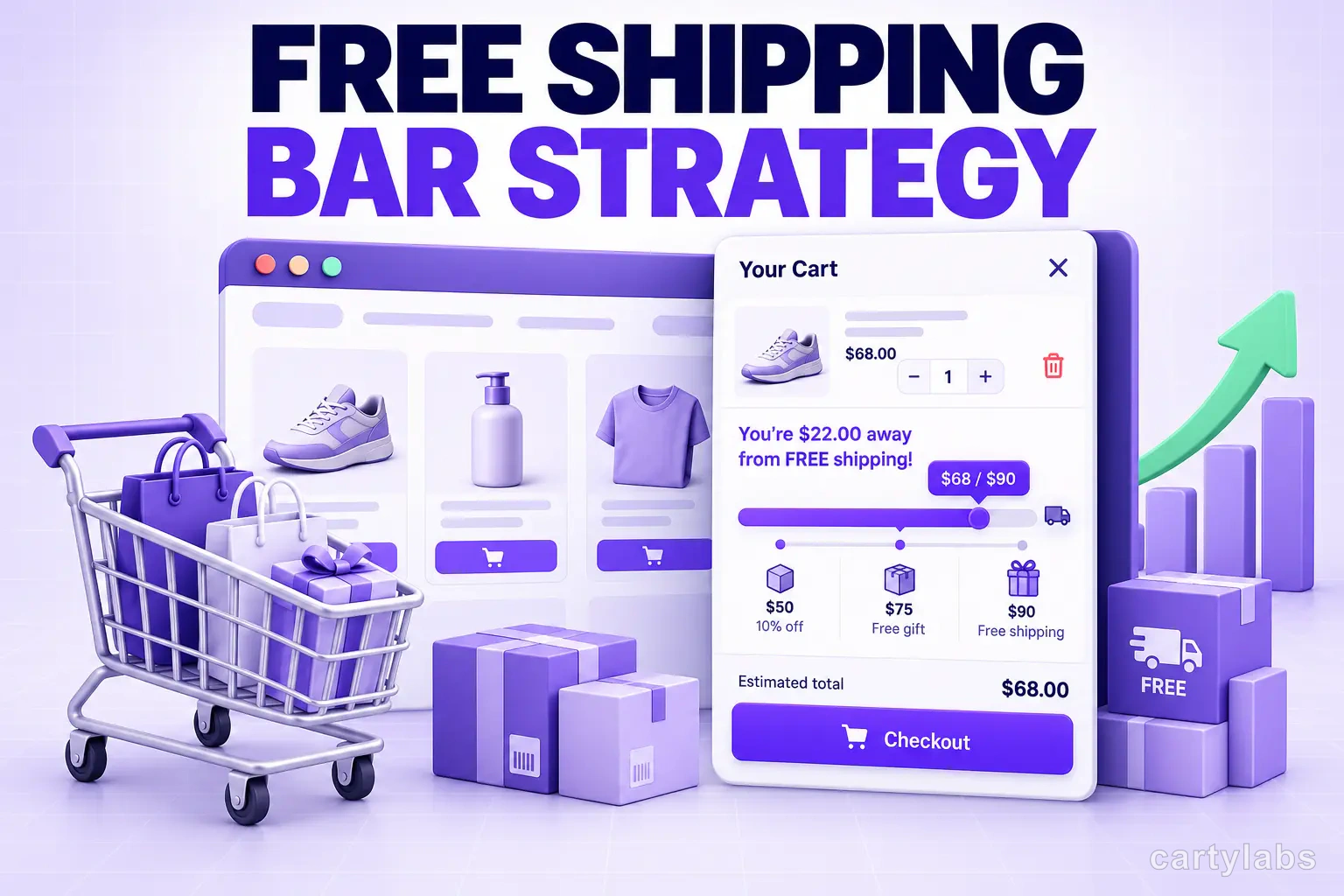
The free shipping bar is the most copied, most miscalibrated growth lever on Shopify. Almost every store has one. Most have it set wrong: either so low it’s already covered by a typical order (no lift), or so high it feels punitive (cart abandonment goes up). The result is a feature that looks like it’s working because shoppers see it, but doesn’t actually move AOV.
This guide is the threshold math: how to pick a number that lifts average order value 12-18% without eroding margin, what to put inside the bar so shoppers actually engage with it, and the Shopify implementation patterns that don’t break on mobile.
Why a free shipping bar works at all
Two psychological levers are doing the work.
1. Loss aversion. Once a shopper has imagined paying $0 for shipping, paying $7.95 feels like a tax, not a fee. They will add a $14 product to avoid the $7.95 charge. Economically irrational, behaviorally consistent across every dataset we’ve ever seen.
2. Goal gradient. The closer a shopper gets to the threshold, the harder they push toward it. A progress bar at 80% completion converts twice as well as one at 20%, even when the absolute dollar gap is identical. This is why a free gift progress bar outperforms a static “Spend $75 for free shipping” notice.
Together, these two effects produce an AOV lift in the 12-18% range when the threshold is set correctly. Set it wrong and you get nothing.
The 30-50% rule (and when to break it)
The rule of thumb that holds across most Shopify catalogs:
Set your free shipping threshold 30-50% above your current average order value.
If your AOV is $58, the threshold goes between $75 and $87. If it’s $112, the threshold goes between $145 and $168.
Why this range:
- Below 30% is a freebie. Most carts already cross it, so you’re paying for shipping you would have paid anyway, with no behavioral lift.
- Above 50% is a wall. The gap feels too large to close with a single add-on, so shoppers stop trying and either check out without the bonus or abandon.
- 30-50% is the sweet spot where adding one more item closes the gap, which is exactly what loss aversion plus goal gradient was designed to exploit.
When to break the rule:
- Low-AOV impulse categories (snacks, candles, socks): push to 60-80% above AOV. Margins are higher and cart-add friction is lower.
- High-AOV considered purchases (mattresses, electronics): stay at 15-25% above AOV. Shoppers won’t double-up on a $1,200 item to save $40 of shipping.
- Subscription stores: tie the bar to first-order AOV, not average, since LTV math is different. See our subscribe-and-save guide for why.
The threshold formula
If you want a number, not a range, use this:
Threshold = AOV × 1.35 + (avg shipping cost × 2)Why the second term: the threshold has to cover not just the marginal product margin but also the shipping you’re now eating on the order and on the next order’s habituation effect. Most stores forget the second multiplier and end up with thresholds that are mathematically reasonable but margin-negative once shoppers learn the pattern.
A worked example. Store A:
- AOV: $62
- Average shipping cost: $7.20
- Threshold = $62 × 1.35 + ($7.20 × 2) = $83.70 + $14.40 = $98.10 → round to $99
Store B:
- AOV: $145
- Average shipping cost: $11.50
- Threshold = $145 × 1.35 + ($11.50 × 2) = $195.75 + $23 = $218.75 → round to $219
Round to a number ending in 9. It tests better than round numbers across virtually every store we’ve measured.
What goes inside the bar
A static “Spend $25 more for free shipping” line is the floor. The ceiling is a stacked rewards bar that turns the threshold into a series of unlocks:
| Threshold | Reward | Why it works |
|---|---|---|
| $50 | Free shipping | Removes the most universal friction |
| $100 | Free gift (sample size) | Adds a tangible item, not just savings |
| $150 | 10% off entire order | Compounds the reason to add more |
Cartylabs supports stacking these natively. The visual is a single bar that fills and re-fills as the shopper crosses each tier, which dramatically outperforms three separate notifications. Read the loyalty rewards integration guide for the full pattern.
Mobile implementation rules
70% of Shopify traffic is mobile, and mobile is where most free shipping bars fall apart:
- Pin the bar to the top of the cart drawer, not the page header. A header bar on mobile is invisible the moment the shopper scrolls.
- Use a progress fill, not a percentage number. “$12 to free shipping” with a visual bar beats “65% to free shipping.”
- Truncate gracefully. “$12 to free shipping + free gift” overflows on a 320px screen. Two-line wrap is fine. Horizontal scroll is not.
- Update the bar in real time as quantity changes. A bar that only updates on page reload kills the goal-gradient effect.
For the cart UX that wraps the bar, see the cart drawer guide.
A 5-step playbook to set your threshold
- Pull 30 days of order data. You need AOV, median order value, and average shipping cost.
- Calculate the formula above. Round to a number ending in 9.
- Set the threshold and let it run for 14 days. Don’t change it during BFCM, sales, or other promo periods. They’ll skew the read.
- Measure two metrics: AOV (should rise 8-15%) and cart-to-checkout rate (should not fall more than 2 points).
- Adjust by $10-20 increments only. Big jumps confuse repeat shoppers who anchor to the previous number.
If AOV doesn’t move within 14 days, the threshold is either too low (no behavioral pressure) or too high (shoppers giving up). Cut the test, look at where the median order is sitting relative to the threshold, and adjust.
Common mistakes that kill the lift
Hiding the threshold until checkout. If shoppers don’t see “$X to free shipping” inside the cart drawer, they can’t optimize toward it. Surface it on every PDP, in the cart drawer, and in the sticky cart icon.
Resetting the bar across pages. Some apps re-render the bar with no animation between pages, which destroys the perception of progress. Use a persistent state.
Pairing with a sitewide discount code. If shoppers can stack a 15% code on top of free shipping, they will, and your margin disappears. Either disable codes when the threshold is met, or set the threshold high enough that the combined offer still hits target margin.
Promising “free shipping” but charging tax/handling. Shoppers who thought they were getting free shipping and see a $4 handling fee at checkout abandon at 3-4x the rate. Just don’t.
Not coordinating with BFCM promotions. During peak season, your free shipping threshold may need to drop temporarily to compete with category-wide free shipping promos.
When not to use a free shipping bar
- High-margin, low-volume luxury. A $4,000 watch shouldn’t be sold with a “Spend $250 more” bar. It cheapens the brand and the threshold is irrelevant to the buyer.
- B2B and wholesale. Buyers expect freight quotes, not consumer-style nudges.
- Single-SKU stores. If you sell one product, there’s nothing to add to cross the threshold. Use a multi-pack volume discount instead. See our mix-and-match bundles guide.
- Already-free-shipping brands. If shipping is always free, the bar has no behavioral asymmetry to exploit. Run a free-gift threshold instead.
- Stores in regions where carrier-calculated shipping is mandatory (some EU markets, parts of LATAM). Free shipping mechanics still work, but the legal disclosure requirements complicate the UX.
How this interacts with your wider AOV strategy
A free shipping bar is one of three AOV mechanics that compound. The full stack:
- Threshold reward (this post) lifts AOV by 12-18%.
- In-cart cross-sells lift AOV by another 6-10%. See our AOV upsell strategies guide.
- Post-purchase upsells add a further 3-7% to revenue per order.
Stacked, those three lift order revenue 25-35% over a non-optimized cart. The free shipping bar is the cheapest of the three to ship and usually the highest-leverage starting point.
A short summary
The free shipping bar is a small UI element doing big behavioral work, but only if the threshold is set right. The math is straightforward: 30-50% above current AOV, ending in 9, surfaced on every page, with a progress fill that updates in real time. Layer a stacked rewards bar on top and you compound the lift.
Set it once, measure for 14 days, adjust in $10-20 increments. Most stores see AOV move within the first week.
Want a stacked rewards bar with the threshold math built in? Install Cartylabs free on Shopify, or book a 15-minute demo and we’ll calibrate the threshold against your live order data.
Learn more: 15 cart drawer examples that boost AOV, How to add upsells to your cart drawer, How to increase AOV on Shopify, Shopify cart drawer app
Next steps
Related Shopify resources
Practical tools and product pages related to this guide.
Keep reading
All articles →
15 Shopify Cart Drawer Examples That Increase AOV
15 real Shopify cart drawers, graded on free-shipping bars, upsells, bundles, rewards, and mobile UX — with the exact tactic to copy from each.
25 Best Shopify Apps to Increase Sales in 2026
25 best Shopify apps to increase sales, organized by revenue problem — with verified pricing and ratings, plus a lean app stack for new, growing, and established stores.
Product Bundles on Shopify: Fixed, Mix-and-Match, BOGO and More
The 6 bundle types on Shopify, the AOV math behind each, and the catalog conditions that make bundles convert. A no-fluff playbook for 2026.
 Install Cart — Free