
Free Gift Progress Bar on Shopify: Stack Rewards to Lift AOV
A Shopify free gift progress bar nudges shoppers to stretch their cart for free shipping, gifts, and discounts. How to design tiers that move AOV.
In this article
- 01 What is a free gift progress bar?#
- 02 Why it works#
- 03 Single tier vs. stacked tiers#
- 04 Setting the right tier values#
- 05 What free gifts to offer#
- 06 Free shipping thresholds: the foundation tier#
- 07 Common Shopify free gift progress bar mistakes#
- 08 How to add a free gift progress bar to Shopify#
- 09 Measuring impact#
- 10 A short summary#
A free gift progress bar at the top of the Shopify cart is the single highest-ROI feature most stores have never tried. The mechanic is simple: show shoppers exactly how close they are to unlocking free shipping, a free gift, or a discount. Watch them add one more item.
In our data across hundreds of Shopify stores, a well-designed progress bar lifts AOV by 8-15% on its own, with a stacked multi-tier version pushing that to 15-22%.
This guide covers how the mechanic works, how to set the right tiers, what gifts to offer, and how to add a free gift progress bar to your Shopify store without theme code.
What is a free gift progress bar?
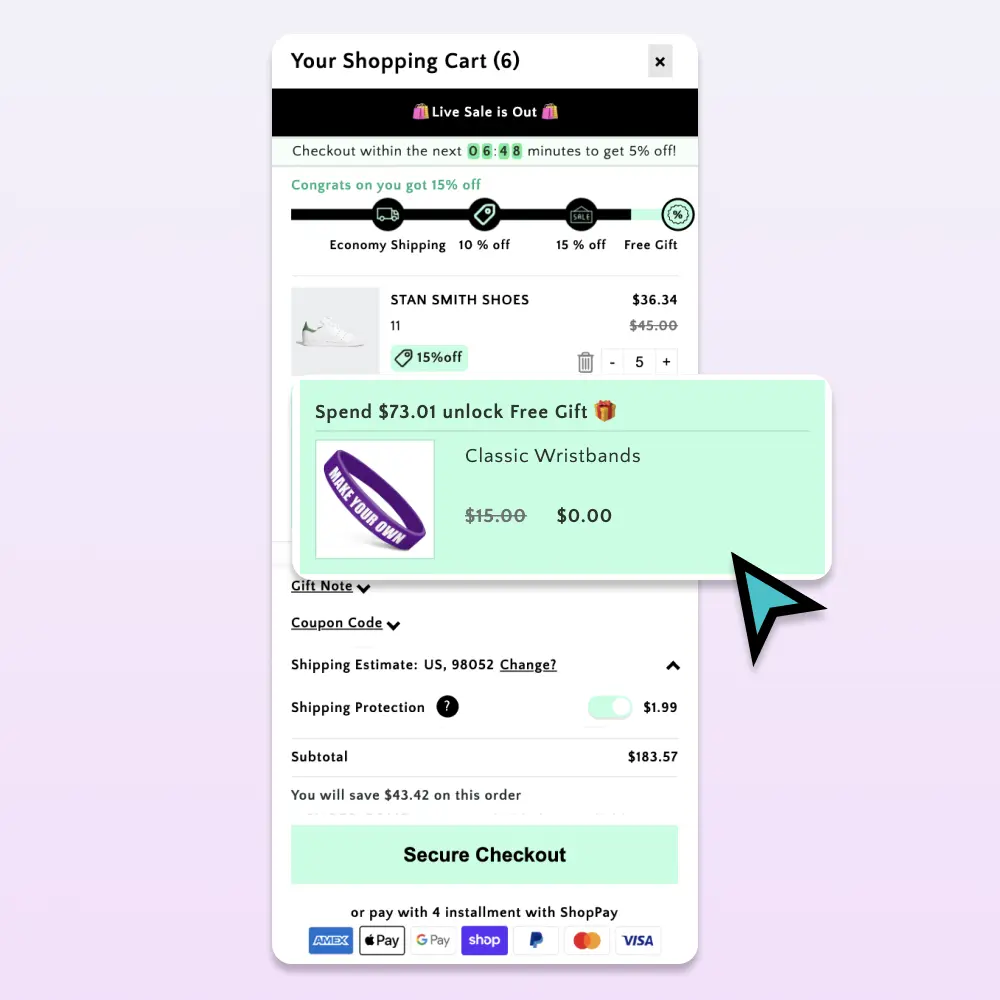
It’s a visual progress indicator pinned to the top of your cart drawer (and optionally the cart page). It usually contains:
- A horizontal bar that fills as the cart subtotal grows
- A label naming the next reward (“Free shipping at $50”)
- A milestone marker for each tier
- A “you’ve unlocked!” state when a threshold is hit
The shopper sees a half-filled bar with “$12 to free shipping” and adds a small item to cross the threshold. That single action lifts AOV by exactly the amount you set the threshold above the median cart.
Why it works
Three behavioral reasons:
1. Loss aversion. Once a shopper sees a half-filled bar, not completing it feels like a loss. The reward becomes a thing they’re giving up rather than a thing they’re earning.
2. Concrete next action. Generic “free shipping over $50” copy in the footer doesn’t drive behavior. A live “$12 more” prompt at the moment of decision does.
3. Cumulative momentum. A stacked bar (free ship → free gift → discount) gives shoppers a next reward as soon as they hit the current one. Each tier is a fresh nudge.
Single tier vs. stacked tiers
The single biggest design choice. Most stores ship one tier (free shipping at $X) and stop there. The data is clear: stacked tiers outperform single tiers by 6-10 percentage points of AOV lift.
A typical stacked structure:
| Spend | Reward |
|---|---|
| $50 | Free shipping |
| $80 | Free travel-size of [hero product] ($14 value) |
| $120 | 10% off the cart |
Why this works: at $50, the shopper has a fresh reward to chase ($80 gift). At $80, they have another fresh reward ($120 discount). The progress bar never goes “empty.”
Setting the right tier values
The math matters. Tiers set too high feel impossible; too low feel pointless. A formula that consistently works:
- Tier 1: ~20% above your median cart value
- Tier 2: ~50% above median
- Tier 3: ~100% above median
If your median cart is $40:
- Tier 1: $50 (free shipping)
- Tier 2: $60-70 (free gift)
- Tier 3: $80-90 (cart discount)
The goal isn’t to make every shopper hit every tier. It’s to make tier 1 feel achievable for most carts and tier 3 feel achievable for the largest carts.
What free gifts to offer
Three rules:
1. Pick something with high perceived value, low actual cost. Travel sizes, sample packs, branded merch, accessories you’d otherwise dispose of as marketing. The shopper should feel they’re getting $15+ of value at a $2-3 hard cost to you.
2. Make it specific, not generic. “Free gift” is vague. “Free travel-size of [Product Name]” gives shoppers a real reason to stretch.
3. Rotate seasonally. A gift the shopper has seen 5 times stops moving carts. Swap monthly or by season.
Examples by category:
| Category | Good free gift |
|---|---|
| Skincare | Travel-size of bestseller, sample pack of 3 SKUs |
| Coffee | 50g of a specialty roast |
| Apparel | Branded tote bag, scrunchie, socks |
| Supplements | 7-day sample of a cross-sell product |
| Pet food | Branded scoop, small treat bag |
Free shipping thresholds: the foundation tier
Free shipping is almost always your tier-1 reward (see also our cart abandonment playbook). It works because:
- Shipping cost is the #1 cited reason for cart abandonment
- It’s an actual shopper benefit (not just a discount they could’ve gotten anywhere)
- The threshold pays for itself when the AOV lift exceeds the shipping cost
The math check: if free shipping costs you $6 and the threshold lifts AOV by $12 with a 50% gross margin, you net $0. At a $20 AOV lift, you net $4 per qualifying order.
Common Shopify free gift progress bar mistakes
Showing the next tier only once the current one is hit. Show all three tiers from the start so shoppers know what’s coming.
Using percentage progress instead of dollar amounts. “70% to your reward” is abstract. “$12 to free shipping” is concrete.
Hiding the bar on mobile. It’s the most powerful single conversion element on a Shopify cart. Don’t compress it away on small screens.
Tier values that don’t match cart distribution. Audit your cart-value histogram. If 60% of carts are under $25, a $50 tier-1 isn’t moving anyone.
Free gifts that look cheap. A blurry stock photo of a “mystery sample” is worse than no gift at all.
Rewards that don’t actually appear in the cart. When a shopper hits the gift threshold, the gift line item should appear immediately, complete with its own thumbnail and “FREE” tag. If it just shows up at checkout, the satisfaction is gone.
How to add a free gift progress bar to Shopify
The hard way: build it in your theme. Liquid for the bar, JS for cart-update events, a custom Shopify Function for the auto-discount, separate logic for each tier. Plan for ~1 week of dev time plus ongoing maintenance.
The easy way: use a Shopify cart app with native progress bar + free-gift logic. Cartylabs ships stacked rewards (free shipping, free gift, % discount, $ off) with one toggle, plus the gift SKU appears as a real line item in the cart drawer. Setup takes about three minutes from the App Store.
Measuring impact
The cleanest A/B: half your traffic gets the progress bar, half doesn’t, for two weeks. Compare:
| Metric | Expected lift |
|---|---|
| AOV | +8-15% (single tier), +15-22% (stacked) |
| Items per order | +0.3 to +0.6 |
| Free shipping uptake rate | 40-65% of carts crossing threshold |
| Free gift attach rate | 20-40% of qualifying carts |
If your numbers are flat, audit the tiers (probably set too high) and the gift quality (probably too generic).
A short summary
A free gift progress bar on Shopify is the highest-leverage AOV mechanic available to most stores. Stack three tiers, set the bottom tier just above median cart value, pick gifts with high perceived value and low cost, and surface the bar prominently in the cart drawer.
Want it on your store? Install Cartylabs free on Shopify. The stacked rewards bar is included in the Growth plan with a 14-day free trial.
Learn more: Shopify free gift app, How to increase AOV on Shopify
Keep reading
All articles →How to Integrate Loyalty Rewards Directly Into Shopify Checkout
Surface Shopify loyalty rewards inside checkout with UI extensions, points balance widgets, and redemption flows that lift returning-buyer conversion four to nine percent on stores with mature programs.
Post-Purchase Magic: Maximize Shopify Revenue After the Click
Turn the Shopify Thank You page into a revenue engine with one-click post-purchase upsells, account creation, referral CTAs, and the cohort-personalized offer flows that lift AOV ten to twenty percent.
How to Increase Average Order Value on Shopify: The Complete 2026 AOV Playbook
The 2026 Shopify AOV playbook covering every lever that lifts average order value, from bundles and upsells to checkout extensions, with a prioritized plan.
 Install Cart — Free