
Going Global on Shopify: Multi-Currency & Multi-Language Cart
International shoppers convert 30-50% better when prices show in their currency and language. Here's how to ship multi-currency in your Shopify cart.
In this article
- 01 What Shopify Markets gives you for free#
- 02 Why the cart is the make-or-break surface#
- 03 What to localize in the Shopify cart drawer#
- 04 Auto-translation vs. human translation#
- 05 Currency display: detection, switching, and stickiness#
- 06 Free-shipping thresholds across markets#
- 07 Multi-language cart UI: the strings that matter most#
- 08 Common multi-currency / multi-language mistakes#
- 09 How to add multi-currency and multi-language to your Shopify cart#
- 10 Measuring international cart impact#
- 11 A short summary#
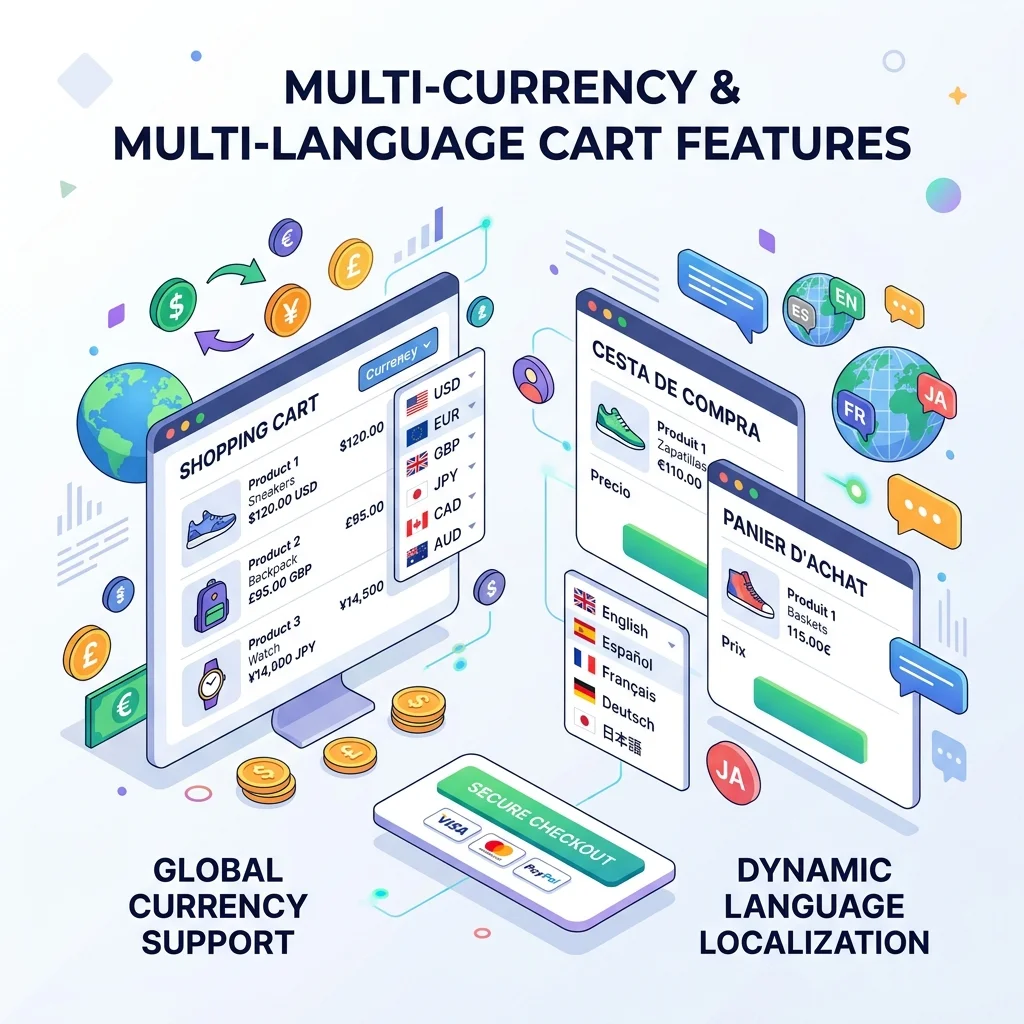
If your Shopify store sells outside its home country, the single biggest conversion lever for international shoppers isn’t ads, SEO, or shipping speed. It’s whether prices show in their currency and the cart speaks their language. International shoppers convert 30-50% better when those two boxes are checked.
This guide covers what Shopify Markets gives you out of the box, what it doesn’t, what to localize in the cart drawer, and how to ship multi-currency and multi-language without manual translation work.
What Shopify Markets gives you for free
Shopify Markets (built-in, free on every plan) handles:
- Multi-currency pricing based on shopper geo-IP
- Country-specific domains and routes
- Tax calculation per market
- Local payment methods (iDEAL in NL, SEPA in EU, Klarna in DACH, etc.)
- Translated checkout for the standard checkout fields
What it doesn’t handle:
- Translating your product titles, descriptions, or collection names
- Translating your cart drawer copy (“Add to cart,” “Subtotal,” “Apply discount”)
- Translating any third-party app UI in the cart
- Localizing your email or marketing copy
That gap, especially in the cart drawer, is where most stores leak international conversions.
Why the cart is the make-or-break surface
International shoppers are already pushing through extra friction: unfamiliar brand, shipping uncertainty, currency conversion. The cart is where they do the final check before paying. If the cart shows:
- “Subtotal: $87.40” (USD) when they live in France
- English copy (“Apply discount”, “Continue to checkout”)
- A free shipping bar that says “$50” without a EUR equivalent
…they bounce. Not because they don’t want the product, but because the cart feels foreign to their context.
A localized cart drawer eliminates that friction in the moment that matters most.
What to localize in the Shopify cart drawer
A short checklist:
Currency:
- Line item prices (synced with Shopify Markets)
- Subtotal, shipping estimate, tax estimate
- Free-shipping threshold (“€45 to free shipping,” not “$50 to free shipping”)
- Discount amounts (“Save €5,” not “Save $5”)
Language:
- All cart UI strings (“Subtotal,” “Quantity,” “Remove”)
- Free-gift and rewards copy (“Add €12 more for a free gift”)
- Promo code field labels and error messages
- Shipping protection toggle copy
- Subscribe & Save copy
- Trust microcopy (“Secure checkout,” “Free returns”)
Number formatting:
- Decimal separators (1,99 € for FR vs. $1.99 for US)
- Thousands separators (€1.299,00 for DE vs. $1,299.00 for US)
- Currency symbol position (€ before, kr after)
Auto-translation vs. human translation
Two approaches:
Auto-translation
Modern auto-translation (DeepL, Google Translate API, GPT-class models) handles cart UI strings well. They’re short, repetitive, and the translation models are good at e-commerce conventions.
For cart UI specifically, “Add to cart,” “Continue shopping,” “Apply discount,” auto-translation is fine. Cartylabs ships auto-translation for cart UI in 25+ languages out of the box.
Human translation
Required for product copy, brand-voice marketing copy, and legally regulated content (return policies, terms). Auto-translation will sometimes get tense or formality wrong in ways native speakers notice.
Most Shopify stores use a hybrid: auto-translate the cart UI and standard product attributes; human-translate brand copy and legal text.
Currency display: detection, switching, and stickiness
Three rules for currency UX:
1. Detect on first visit, let shoppers override. Use geo-IP to default to the local currency. Show a small currency switcher in the header for shoppers who want to override (expats, travelers, B2B buyers paying in USD).
2. Persist the choice. Once a shopper picks EUR, every page should stay in EUR until they leave. Don’t reset to USD on the cart page.
3. Show the currency symbol everywhere. “$87.40” without a flag or “USD” prefix is ambiguous if you sell in multiple dollar currencies (USD, CAD, AUD, NZD).
Free-shipping thresholds across markets
A common mistake: setting a single $50 free-shipping threshold and converting it dynamically per market. Currency exchange means:
- $50 in USD = €46 in EUR = ¥7,500 in JPY = ₹4,150 in INR
The first three are reasonable thresholds. The INR number probably doesn’t match Indian shopper expectations or your local logistics costs.
The fix: set per-market thresholds explicitly. €50 for EUR, $50 for USD, ¥8,000 for JPY, ₹3,000 for INR, based on each market’s typical cart size and shipping economics.
Multi-language cart UI: the strings that matter most
If you’re prioritizing what to translate first, in order:
- CTA buttons (“Checkout,” “Add to cart,” “Continue shopping”)
- Subtotal and price labels
- Free-shipping / rewards bar copy
- Promo code field
- Shipping protection toggle copy (if you offer it)
- Trust microcopy (“Secure checkout,” “Free returns”)
- Empty cart state
- Error messages
Get the top 5 right and you’ve covered ~90% of the UI a shopper will see during a cart session.
Common multi-currency / multi-language mistakes
Showing USD prices to international shoppers because “they understand it.” Most don’t, and the ones who do mentally convert at a worse rate than your geo-detection would. Conversion drops.
Translating only some pages. Half-localized stores feel broken. If you can’t translate everything, start with the cart drawer (highest impact) and the homepage hero, then expand.
Forgetting the cart-app UI. Your beautifully localized Shopify theme is undermined if the cart drawer still says “Continue to checkout” in English to a Japanese shopper.
Hard-coding currency symbols in product descriptions. “Save $20!” in the description shows literal “$20” to every shopper regardless of market. Use Shopify’s currency liquid filter or skip it entirely.
Ignoring number formatting. “1,000.00 €” looks broken to a German shopper expecting “1.000,00 €.”
How to add multi-currency and multi-language to your Shopify cart
Step 1: Enable Shopify Markets. Free, ~10 minutes from the admin. Sets up currency, payment methods, and checkout per market.
Step 2: Localize your product catalog. Use Shopify’s Translate & Adapt app (free) or a third-party translation app for product titles, descriptions, and metafields.
Step 3: Localize the cart drawer. This is where most stores stop. Use a cart app like Cartylabs that ships auto-translation for cart UI and respects Shopify Markets pricing, with no manual configuration per market.
Measuring international cart impact
Track per-market:
| Metric | Why |
|---|---|
| Conversion rate by country | The headline number |
| Bounce rate on cart page | High = currency/language mismatch |
| Cart abandonment by country | Same signal |
| AOV in local currency | Should match domestic AOV roughly |
| Free-shipping uptake by country | Reveals threshold misalignment |
A 30-50% conversion lift in a localized market vs. an unlocalized one is normal. If the lift is smaller, the localization probably isn’t reaching the cart UX. (For the non-localization side of cart leakage, see our cart abandonment playbook.)
A short summary
Multi-currency and multi-language in the Shopify cart is the single highest-leverage international conversion change. Shopify Markets handles checkout and pricing for free. The cart drawer copy and UI is what you have to fill in, and that’s where most stores leak conversions.
Want auto-translated cart UI and Shopify Markets-aware pricing in one app? Install Cartylabs free on Shopify. International localization is included in the Growth plan, with a 14-day free trial.
Learn more: Shopify cart drawer app, Cartylabs features
Next steps
Related Shopify resources
Practical tools and product pages related to this guide.
Keep reading
All articles →
Cart Icon UX: 9 Patterns That Reduce Drop-Off
Shopify cart icon UX best practices: 9 patterns that reduce drop-off and lift cart re-engagement, with examples and conversion data from 2026.
The Ecommerce CRO Checklist: 60 Checks From Instrumentation to Post-Purchase
A platform-neutral conversion rate optimization checklist for ecommerce. Instrumentation, prioritization, test design, and 40 page-level checks across landing, product, cart, checkout, and post-purchase.
15 Shopify Cart Drawer Examples That Increase AOV
15 real Shopify cart drawers, graded on free-shipping bars, upsells, bundles, rewards, and mobile UX — with the exact tactic to copy from each.
 Install Cart — Free