
Shopify Cart Shipping Messages: Why Rule Order Matters
Shopify cart shipping messages in Cartylabs Growth use ordered market and cart-total rules. Learn how to write accurate delivery expectations before checkout.
In this article
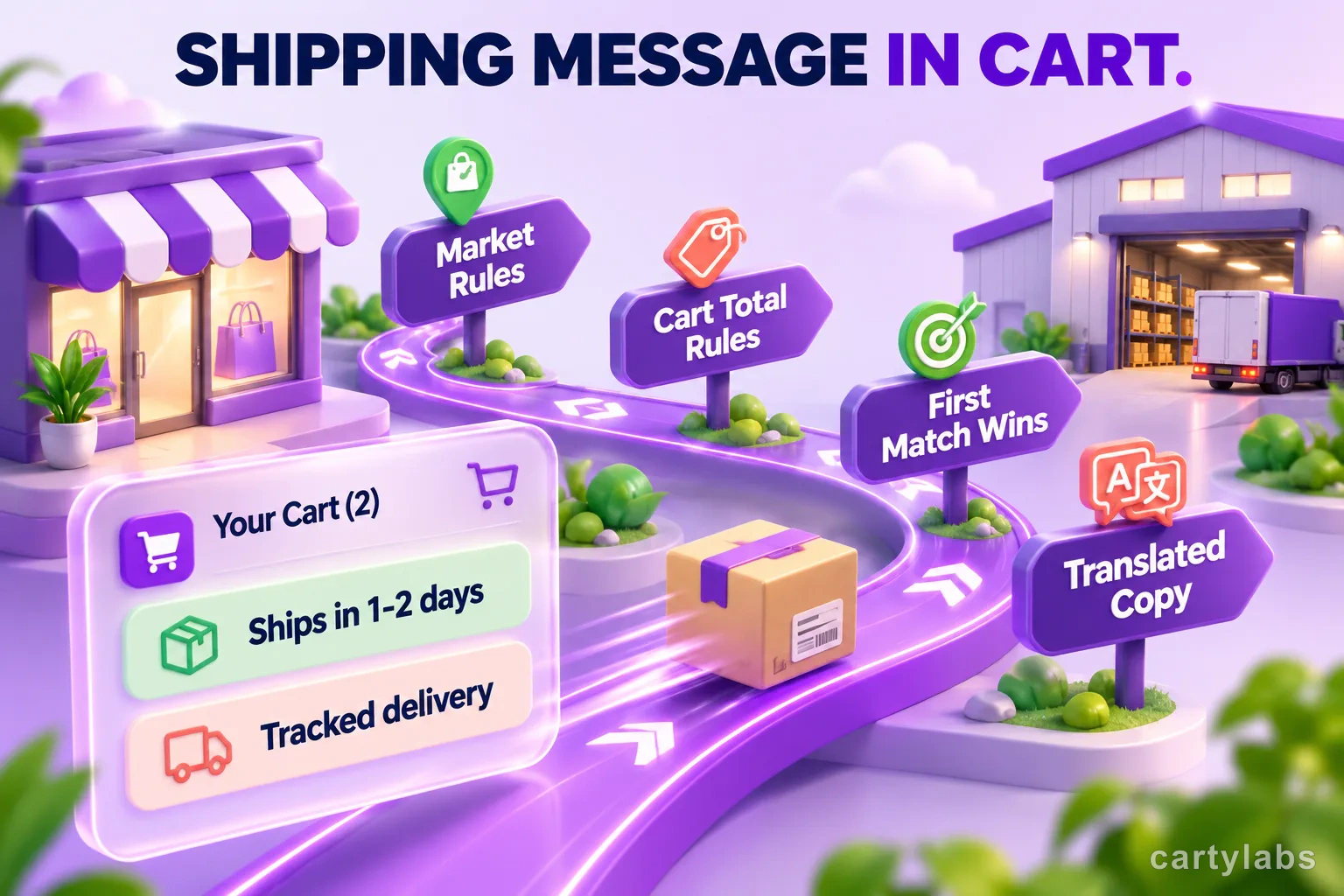
Give shoppers delivery context while they review the cart, not only after they enter checkout. Cartylabs’ Growth plan shipping and delivery message adds a concise, customizable line to the cart drawer, helping shoppers understand dispatch expectations and relevant market details before they continue. Use two text segments for a clear promise, such as dispatch timing beside the delivery service.
The message supports dynamic values such as cart total, subtotal, item count, country, and currency. It is informational copy, not a carrier-rate calculator or a guaranteed arrival date.
Key takeaways
- Cartylabs shipping and delivery messages are a Growth feature and appear in the cart drawer.
- Ordered conditions use the first enabled match, so put specific rules before a catch-all.
- Market and cart-total conditions can change the message shoppers see.
- The message communicates delivery context, not a carrier rate or guaranteed arrival date.
What shoppers see in the cart
Use the left and right text segments for one compact statement, such as “Dispatches in 1-2 business days” alongside “Tracked delivery.” Set wording that reflects your fulfillment policy.
The message supports tokens that can be substituted with current cart or shopper context. For example, [item_count] can refer to the number of items, [subtotal] to the subtotal, [total] to the cart total, [country] to the shopper’s country, and [currency] to currency. A hypothetical coffee shop might write: “Your [item_count] bags are packed fresh” and “Delivery details for [country].” Keep each sentence useful on its own, especially on narrow screens.
Cartylabs can display translated versions of the merchant-authored message when translations are available. Localize delivery terms for each market so shoppers can understand the promise.
The shipping message is separate from the cart’s free-shipping progress bar. The progress bar tells a shopper how close they are to a shipping threshold; a shipping message can explain a delivery expectation or present market-specific copy. Give each element a distinct job: the bar communicates progress toward a shipping threshold, while the message explains delivery expectations or market-specific details.
For region-specific wording and translation review, see market settings and auto-translation for Shopify carts. Merchants comparing estimates and optional add-ons can also review three shipping tools for the cart.
Conditions decide which copy appears
Merchants configure an ordered list of conditions. Each condition can contain one or more predicates and has its own message. Conditions are evaluated from top to bottom, and the first enabled match wins. In other words, order is part of the configuration, not just a display preference.
The current condition fields include market and cart total. A market rule can include or exclude selected markets, and a cart-total rule can compare the cart against an amount using a greater-than or less-than operator. If a condition has multiple predicates, the merchant can choose whether all must match or any one may match. A condition with no predicates acts as a catch-all, so it belongs after more specific rules. If a catch-all sits first, later rules cannot be reached.
For example, a tea shop can put an international-market condition first and a domestic catch-all afterward. A cart-total condition can show different handling details for small and large orders. Give each rule copy that explains the relevant fulfillment difference.
Cart-total rules update as shoppers add or remove items, and market rules use the shopper’s market and country context. Add a final catch-all when you want every shopper to see a message.
For a straightforward setup, create one rule for a shipping difference your team already handles, such as a longer dispatch window for a specific market. Add the relevant market, write the matching copy, and make sure the general message sits below that rule. Preview carts for both the specific market and the default market. To add a threshold, create a separate cart-total rule, choose the amount and comparison, then position it above a broader market rule if it should take precedence. Keep the rule list easy to scan so future edits do not accidentally change which message shoppers receive.
During peak season, use the same principles for a clear holiday delivery cutoff message.
Why set expectations before checkout?
A clear delivery statement answers practical questions before checkout: when the order dispatches, whether the store ships to a shopper’s market, and what delivery service to expect. That context helps shoppers decide whether the order fits their timing and needs.
Make the promise specific and grounded in what your team controls. “Orders usually leave our warehouse within two business days” gives a useful dispatch expectation without promising a carrier-controlled arrival date. Clarify business days, cut-off times, holidays, preorder items, and market exceptions when they affect fulfillment.
A practical setup checklist
- Write the operational truth first. Confirm dispatch times, carrier services, markets served, and any exceptions with the people who fulfill orders.
- Keep the message brief. Aim for one clear promise or explanation, rather than a paragraph competing with products and checkout.
- Use specific rules only when copy changes. If two market groups receive the same message, they may not need separate conditions.
- Put narrow rules before broad rules. Check the order and place an all-shopper catch-all last.
- Choose predicates that reflect real differences. A cart-total threshold is useful only if it changes the relevant handling or delivery information.
- Test a cart in each target market and at each threshold. Confirm that the intended message appears, updates after cart changes, and does not contradict checkout shipping options.
- Check translated copy. Verify terminology, time units, punctuation, and whether delivery timelines remain accurate in each language.
- Keep the message in sync with operations. Update it when warehouse schedules, carrier services, or holiday cutoffs change.
A quick review can prevent contradictory copy: compare each condition with your shipping policy and checkout options, then test one cart above and below each amount. If you operate multiple markets, ask the fulfillment team to confirm the wording for each destination. Merchants can also reuse the same message across markets when the promise is truly the same, rather than maintaining unnecessary duplicate rules.
Keep the message consistent with your shipping policies and checkout rates. For more on communicating shipping costs and thresholds, see transparent shipping fees and the free shipping bar strategy.
Shipping and delivery messages are included on Growth. See Cartylabs pricing and cart drawer features.
FAQ
Which Cartylabs plan includes shipping and delivery messages?
The feature is included on Growth. It adds a customizable message to the cart drawer.
Can messages change by market or cart total?
Yes. Ordered conditions can use market and cart-total rules. The first enabled matching condition determines the message.
Does the message calculate shipping rates?
No. It is informational copy, not a carrier-rate calculator or a guaranteed delivery date.
Next steps
Related Shopify resources
Practical tools and product pages related to this guide.
Keep reading
All articles →
Shopify Cart Analytics: What Growth Reports Reveal
Shopify cart analytics in Cartylabs range from a Free 30-day summary to Growth conversion, engagement, order reports, shopper journeys, and Excel export.
Shopify Mini Cart Best Practices (with Examples)
Shopify mini cart best practices: layout, copy, mobile rules, and 12 patterns from high-converting stores. Concrete examples and AOV data for 2026.
Slide Cart vs Cart Drawer vs Cart Page: Which Converts Best?
Slide cart vs cart drawer vs cart page: a data-backed breakdown of which Shopify cart UX converts best, when each one wins, and how to pick for your store.
 Install Cart — Free