
Countdown Timers in the Shopify Cart: Urgency Without Dark Patterns
A Shopify cart countdown timer can lift conversion 5-10%, but done wrong it trashes your brand. How to use cart countdowns honestly.
In this article
- 01 What is a cart countdown timer?#
- 02 The four types that actually work#
- 03 The countdown patterns that don’t work#
- 04 Where to place countdown timers in the cart#
- 05 Designing a countdown timer that doesn’t feel scammy#
- 06 When NOT to use a countdown timer#
- 07 Countdown timers and Shopify Functions#
- 08 Measuring cart countdown impact#
- 09 A short summary#
A countdown timer in the Shopify cart is one of the most polarizing UX patterns in e-commerce. Done well, it lifts conversion 5-10% and creates genuine urgency for time-limited offers. Done poorly, it screams “scammy ad copy” and trains shoppers to ignore everything you say.
This guide covers when Shopify cart countdown timers earn the urgency, when they don’t, the four types of countdowns that work, and how to ship them without becoming the store everyone screenshots for the “dark patterns of the week” tweet.
What is a cart countdown timer?
A small visual element, often a digital clock or a progress bar, counting down to the end of a promotional event in the cart drawer. Common formats:
- HH:MM:SS clock (“Sale ends in 02:14:38”)
- Banner with time-left text (“Free shipping ends in 4 hours”)
- Cart-hold timer (“Reserved for 10 minutes”)
Each serves a different purpose, and each has its own honesty bar.
The four types that actually work
1. Real promotional countdown
A real sale that really ends. Black Friday (see our BFCM playbook), a 24-hour flash sale, a product-launch window. The timer matches a real deadline.
Why it works: there is actual urgency, and shoppers have a genuine reason to convert before the deadline.
Honesty test: if the timer says the sale ends at midnight, the sale must actually end at midnight.
2. Limited-quantity countdown
“Only 3 left at this price,” counted down as units sell. Best for limited-edition, end-of-season, or low-stock SKUs.
Why it works: scarcity is real and verifiable.
Honesty test: the count must reflect actual inventory. Faking “only 3 left” when you have 300 in the warehouse is the canonical dark pattern.
3. Free-shipping or discount window
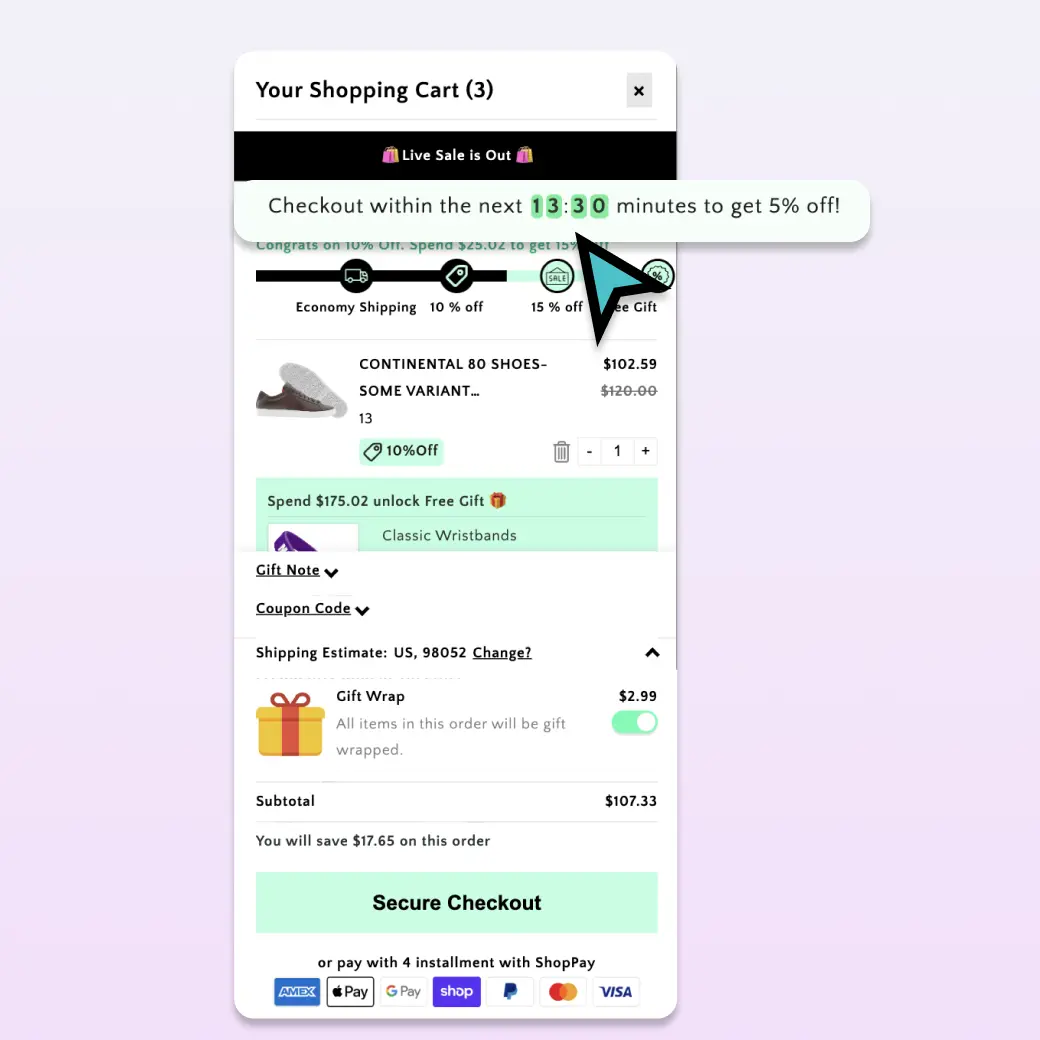
“Free shipping ends in 8 hours” or “Save 10% if you check out in the next 30 minutes.” A real, time-bounded incentive that disappears after the timer. (Pair this with a free-shipping progress bar to show exactly what they unlock.)
Why it works: the timer is tied to a concrete benefit the shopper loses if they wait.
Honesty test: the discount must actually expire. A “limited time” offer that returns next week loses credibility forever.
4. Cart-hold timer
“Items reserved for 10 minutes.” Common on event-ticketing, BFCM, or limited-stock launches.
Why it works: it sets clear expectations about whether stock will still be there if the shopper takes a break.
Honesty test: if the cart actually releases the inventory after 10 minutes, this is honest. If it doesn’t, you’ve trained shoppers to ignore your timers.
The countdown patterns that don’t work
Three patterns that lose more than they gain:
Permanent fake countdown
A 24-hour timer that resets every time the page loads. Shoppers notice. They post screenshots. Your brand becomes a meme.
”Sitewide sale ends in 47:12:08”
If the timer is always counting down to “ends today” without ever actually ending, it’s a permanent dark pattern. Shoppers learn to discount everything you say.
Timers on every product page
If every product has a “limited time offer,” nothing is limited. Save countdowns for actual events.
Where to place countdown timers in the cart
Three placements, in order of subtlety:
Above the cart line items: a slim banner at the top of the drawer. Best for sitewide events (“Free shipping ends in 4 hours”).
Inline with a discount: “10% applied, expires in 14:32.” Tied directly to the visible discount.
Footer of the cart: a small note above the checkout button. Lower-pressure version of the banner.
Avoid pop-up modal countdowns that block the cart. That’s interruption, not urgency.
Designing a countdown timer that doesn’t feel scammy
A short list of design rules:
- Use minutes/hours, not always-on seconds. “Ends in 4 hours” feels reasonable; “02:14:38” with seconds ticking down feels manipulative.
- Match the timer styling to your brand. A neon red countdown on a beige minimalist store screams “bolted-on app.” Use your brand colors.
- Show what ends. Always pair the timer with the offer it controls. Write “Free shipping ends in 4 hours,” not just “4:00:00.”
- Hide it when nothing time-bounded is happening. Don’t run a permanent timer on a permanent offer.
- Mobile-size it. A timer that pushes the checkout button below the fold on mobile costs more conversion than it gains.
When NOT to use a countdown timer
A few situations where countdowns hurt:
- High-consideration purchases. Furniture, electronics, anything shoppers research for days. Urgency clashes with the consideration cycle.
- Subscription products. Long-term commitments don’t pair with short-term timers.
- Premium / luxury brands. Urgency feels desperate. Status brands trade on the opposite signal.
- B2B catalogs. Procurement workflows take weeks. A 4-hour timer is irrelevant.
Countdown timers and Shopify Functions
For dynamic discounts that actually expire (not just visually), the underlying logic should run through Shopify Functions or your Shopify Payments rules. The timer is the display layer; the discount enforcement happens server-side.
Cartylabs handles this end-to-end: set a discount rule with an end time in the dashboard, and the cart app surfaces both the visible countdown and the auto-applied discount that expires on the same schedule.
Measuring cart countdown impact
The right test: 50/50 traffic split for a real sale event (e.g., a 48-hour flash sale). Compare:
| Metric | Expected change |
|---|---|
| Cart-to-checkout rate during sale | +5-10% with countdown vs. without |
| AOV | Flat to +2% |
| Brand sentiment (post-purchase NPS) | Should not drop |
| Repeat purchase rate (60-day) | Should not drop |
The brand sentiment and repeat-purchase metrics matter most. If short-term conversion lifts but those numbers drop, you’ve borrowed against your future.
A short summary
Cart countdown timers work when they’re tied to real events with real deadlines and real benefits that actually expire. They fail when they’re permanent fixtures, fake scarcity, or visual manipulation that ignores the underlying offer.
Use them sparingly, honestly, and only when there’s a real urgency to communicate.
Want countdown timers tied to real Shopify discount rules? Install Cartylabs free on Shopify. Countdowns and promo offers are part of the Growth plan, with a 14-day free trial.
Learn more: Shopify cart drawer app, How to increase AOV on Shopify
Next steps
Related Shopify resources
Practical tools and product pages related to this guide.
Keep reading
All articles →
Cart Icon UX: 9 Patterns That Reduce Drop-Off
Shopify cart icon UX best practices: 9 patterns that reduce drop-off and lift cart re-engagement, with examples and conversion data from 2026.
The Ecommerce CRO Checklist: 60 Checks From Instrumentation to Post-Purchase
A platform-neutral conversion rate optimization checklist for ecommerce. Instrumentation, prioritization, test design, and 40 page-level checks across landing, product, cart, checkout, and post-purchase.
15 Shopify Cart Drawer Examples That Increase AOV
15 real Shopify cart drawers, graded on free-shipping bars, upsells, bundles, rewards, and mobile UX — with the exact tactic to copy from each.
 Install Cart — Free