
The Zero-to-One Shopify Email Marketing Strategy
How to set up your first email flows for a Shopify store. The exact welcome series and abandoned cart sequence used by $10M+ DTC brands.
In this article
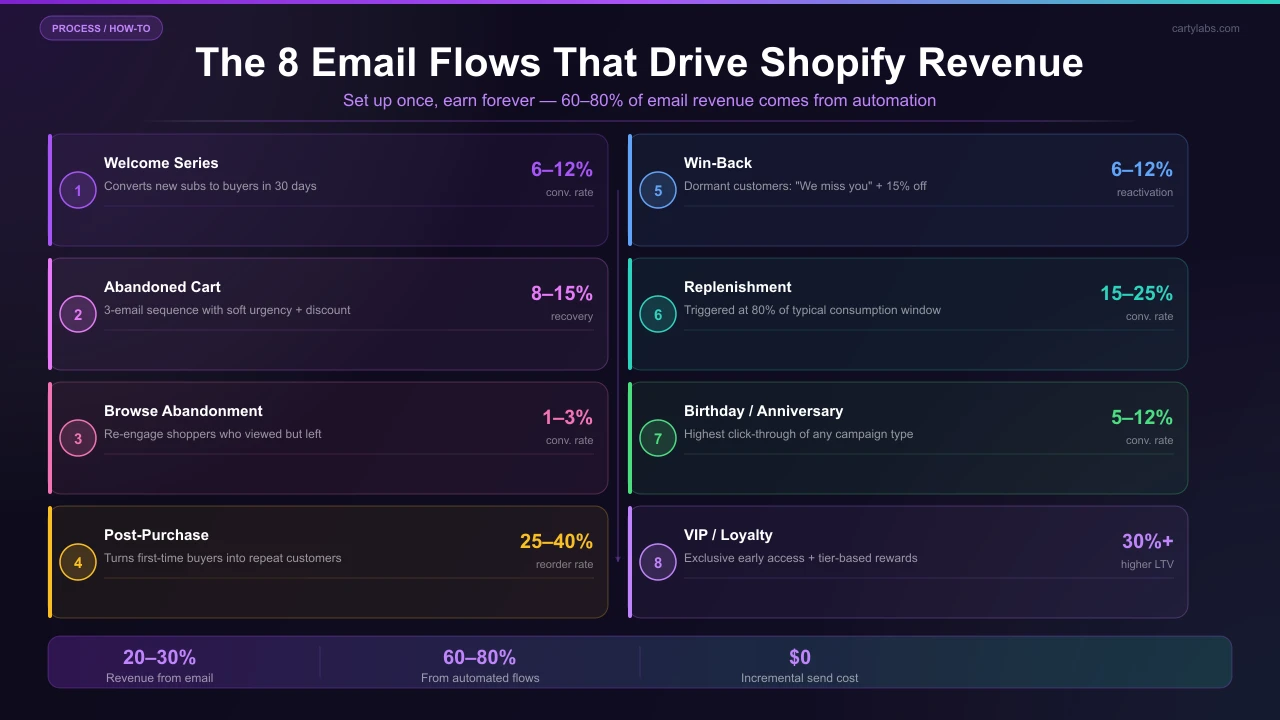
Email is the highest-ROI marketing channel for most Shopify stores, typically driving 20-30% of revenue at a fraction of the cost of paid ads. But the revenue concentrates in a small number of automated flows, not in your weekly newsletter.
This guide covers the 8 email flows every Shopify store should be running, the specific triggers and timing for each, and the copy patterns that work. We’ll use Klaviyo as the reference platform, but the patterns translate to Mailchimp, Omnisend, Shopify Email, or any modern ESP.
Why automated flows beat campaigns
Campaigns (newsletters, promotional sends) require constant work and have predictable revenue. Flows are set up once and earn revenue forever. Usually 60-80% of total email revenue comes from flows, not campaigns.
The tradeoff: flows take initial setup work. Once they’re running, they’re free.
The 8 flows
1. Welcome series (first email opt-in)
Trigger: new email subscriber (popup, footer signup, checkout opt-in) Length: 3-4 emails over 7-10 days Goal: convert the subscriber to a first-time buyer
Email 1 (immediate): Welcome + the discount or freebie you promised + 1-2 hero products. Email 2 (2 days later): Brand story / why you exist + best-sellers carousel. Email 3 (5 days later): Social proof including top reviews, founder note, and UGC. Email 4 (8 days later): Last call on the welcome offer + urgency.
Conversion rate target: 6-12% of subscribers convert to first-time buyers within 30 days of signing up.
2. Abandoned cart flow
(See also our Shopify cart abandonment playbook for the on-site fixes that complement the email flow.)
Trigger: added to cart, didn’t complete checkout Length: 3 emails over 36 hours Goal: recover the cart
Email 1 (1 hour after abandon): “You left something behind.” Show the cart contents. No discount. Email 2 (24 hours): Soft urgency with a line like “These items are popular, may sell out.” Optional: 5% off. Email 3 (48 hours): Last call. Stronger discount (10-15%) for shoppers who haven’t converted.
Recovery target: 8-15% of abandoned carts.
3. Browse abandonment flow
Trigger: viewed a product, didn’t add to cart Length: 2 emails over 36 hours Goal: bring browsers back
Email 1 (4 hours): “Still thinking about it?” + the product they viewed + 2-3 similar items. Email 2 (36 hours): Reviews of the product + a soft urgency line.
Conversion target: 1-3% (lower than cart abandon, since these shoppers were less committed).
4. Post-purchase flow
Trigger: completed first order Length: 4-5 emails over 30 days Goal: drive a second purchase + collect a review
Email 1 (immediate): Order confirmation (transactional, let Shopify send this). Email 2 (2 days after ship): “How’s it going?” as a pre-emptive support touch. Reduces returns. Email 3 (10 days after delivery): Review request with a $5 credit incentive. Email 4 (20 days after delivery): Cross-sell related products with a “thanks for being a customer” framing. Email 5 (45 days after delivery): VIP tier signup or subscription pitch.
Repeat-purchase target: 25-40% of first-time buyers convert within 60 days.
5. Win-back flow
Trigger: customer hasn’t purchased in 90 days (adjust per category) Length: 3 emails over 14 days Goal: reactivate dormant customers
Email 1: “We miss you” + their last purchase shown for context + a 15% discount. Email 2 (5 days): What’s new since they last shopped (new collections, restocks). Email 3 (12 days): Last call discount, slightly larger (20%).
Reactivation target: 6-12% of recipients buy within 30 days.
6. Replenishment flow
(For consumables, also consider a Subscribe & Save toggle in the cart for the highest-LTV alternative.)
Trigger: time-based, calculated from product consumption rate Length: 1-2 emails Goal: trigger a reorder
For consumable categories only (coffee, supplements, skincare, pet food). Calculate the typical consumption window. That’s 30 days for a coffee bag, 45 for a supplement bottle, 60 for a skincare jar. Send the email at 80% of that window.
Email 1: “Running low? Reorder in one click.” + their last-purchased SKU. Email 2 (7 days later, if no order): “Still need a refill? Save 10% on subscribe & save.”
Conversion target: 15-25% of recipients reorder.
7. Birthday / VIP recognition flow
Trigger: customer’s birthday OR crossing a VIP threshold (LTV > $X) Length: 1 email Goal: make loyal customers feel seen
Birthday: a free gift with their next purchase. No purchase required to redeem. VIP: a thank-you note from the founder + early access to a new product.
Lift target: VIP recognition emails consistently produce 25-40% click-through and 5-12% conversion. Far above generic promotional sends.
8. Back-in-stock flow
Trigger: product the customer requested an alert for is restocked Length: 1 email (sometimes 2) Goal: capture demand for sold-out items
Email 1 (immediate when restocked): “It’s back” + product + “Limited stock” if true. Optional Email 2 (24 hours later, if no purchase): Soft nudge with a “Selling fast” message.
Conversion target: 12-25% (these are highly intentional shoppers).
Campaigns to layer on top
Once flows are running, weekly/bi-weekly campaigns fill out the calendar:
- Product launches
- Seasonal promotions
- Educational content (use cases, behind-the-scenes, founder updates)
- BFCM and major sales
Campaign cadence sweet spot for most stores: 1-2 sends per week. More than that risks unsubscribes; less leaves money on the table.
List growth tactics
The flows above only work if you’re building the list. Three tactics that consistently work:
1. Exit-intent popup with a real offer. “10% off your first order” is industry standard. Subscribers from popups convert at 2-4% of opt-in volume.
2. Footer signup with social proof. “Join 12,000 customers who get our weekly tips.”
3. Checkout opt-in. Pre-checked email opt-in at checkout. Most legally compliant in the US; check GDPR/CASL rules for EU/CA.
Segmentation matters more than copy
The biggest revenue lever in email isn’t the copy. It’s who gets the email. Build segments for:
- New subscribers (pre-purchase)
- First-time buyers (just bought once)
- Repeat buyers (2-4 orders)
- VIPs (5+ orders or $X+ LTV)
- Lapsed (no purchase in 90+ days)
- Subscribers (recurring revenue)
Different flows hit different segments. A “win-back” email to a brand-new subscriber feels insulting. A welcome series to a 5-time VIP feels stupid.
Common email marketing mistakes
Sending the same campaign to everyone. Segment.
No abandoned cart flow at all. This is the single highest-revenue flow, typically 5-10% of total store revenue when running.
Discounting too aggressively, too often. Trains shoppers to wait for discounts and erodes margin.
Plain-text-only emails. Modern email clients render rich HTML; using plain text leaves a lot of conversion on the table for product-driven stores.
Cluttered templates. A clear hero image, a single CTA, and a P.S. line form the skeleton of a high-converting transactional email.
Sending from a no-reply address. Use a real, monitored inbox (hello@, support@). Replies are valuable signal and they also help deliverability.
Measuring email performance
Track per-flow:
| Metric | Healthy range |
|---|---|
| Open rate | 30-50% |
| Click rate | 3-7% |
| Conversion rate | 1-5% (varies by flow) |
| Revenue per recipient | $0.50-$2.00 (campaigns), $2-$10 (flows) |
| Unsubscribe rate | under 0.3% per send |
Email contributes 20-30% of total store revenue when the flows are running. If you’re at 10% or less, you’re missing flows.
A short summary
Shopify email marketing is mostly about flows, not campaigns. Set up the 8 flows above (welcome, abandoned cart, browse abandon, post-purchase, win-back, replenishment, VIP/birthday, back-in-stock), segment your list, and let the automation do the work.
Want abandoned-cart recovery that’s tied to the actual cart UX? Install Cartylabs free on Shopify. It pairs with Klaviyo, Omnisend, and Shopify Email out of the box.
Learn more: Reduce cart abandonment on Shopify, Shopify cart drawer app
Next steps
Related Shopify resources
Practical tools and product pages related to this guide.
Keep reading
All articles →
Best Shopify Cart Drawer Apps 2026 (Ranked & Tested)
The best Shopify cart drawer apps for 2026, ranked and tested on AOV lift, AI upsells, rewards, pricing, and setup time. Honest picks for every store size.
Amp Slide Cart vs Cartylabs: Feature-by-Feature Breakdown
Amp Slide Cart vs Cartylabs compared on Shopify cart drawers, AI upsells, rewards bars, pricing, and setup. An honest, tested breakdown for 2026 merchants.
Volume Discounts & 'Buy More, Save More' Tactics for Shopify
Volume discounts lift AOV 15-30% on the right catalogs. The tier math, the SKU rules, and the Shopify implementation patterns that don't erode margin.
 Install Cart — Free