
Shopify BFCM Playbook: Pre-Black-Friday Checklist for Peak Traffic
BFCM is the highest-traffic, highest-revenue weekend on Shopify. A 60-day prep checklist for ads, site speed, cart UX, inventory, and the day-of war room.
In this article
Black Friday Cyber Monday (BFCM) is the highest-stakes weekend in Shopify e-commerce. Stores routinely do 5-10x their normal weekly revenue across 4-5 days. The stores that win in November have prepared since September.
This playbook covers the 60 days of BFCM prep, the day-of war-room checklist, and the post-mortem that turns this BFCM into next year’s competitive edge.
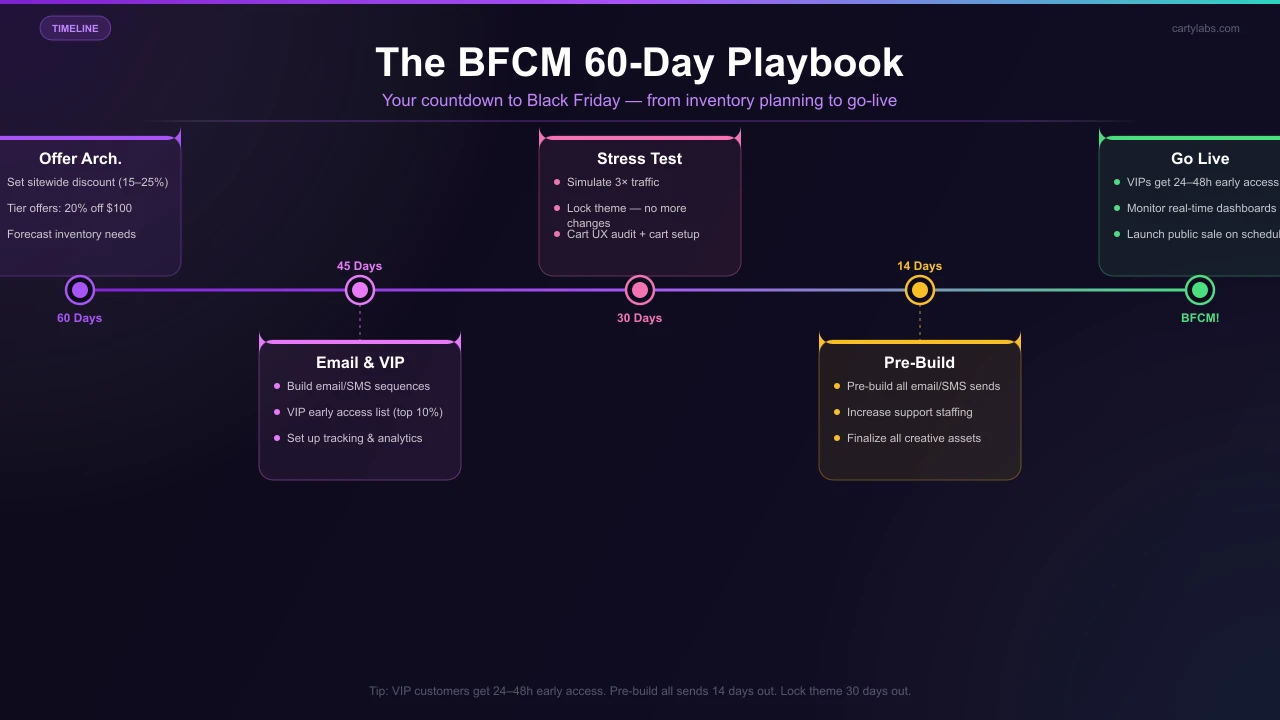
60 days out (early September)
1. Set your offer architecture
Decide now:
- Sitewide discount (15%? 20%? 25%?)
- Tiered offers (“20% off $100, 25% off $200”)
- Free gifts (at what threshold?)
- Free shipping threshold during BFCM
- Subscription/bundle promotions
Document the structure in a single shared doc so the marketing, support, and dev teams operate from the same plan.
2. Forecast inventory
Pull last year’s BFCM SKU-level sales. Apply your YoY growth rate. Add a safety buffer for hero SKUs (the ones that go viral on TikTok). Order now, because most overseas suppliers have 6-12 week lead times that crowd into late October.
3. Audit your Shopify theme for performance
Run PageSpeed Insights on:
- Homepage
- Top 5 PDPs by traffic
- Top 3 collection pages
- Cart drawer (open in dev tools)
Target: LCP <2.5s, CLS <0.1, TTFB <600ms. If you’re worse, fix the offending images and scripts in September. The dev team will be busy in November.
4. Audit third-party apps
Every Shopify app that injects scripts on the storefront adds latency. Walk through your installed apps and uninstall anything you don’t actively use. For the ones you keep, check their changelog to make sure they’ve handled past BFCM volume.
45 days out (mid-October)
5. Set up tracking
- Verify Google Analytics 4 or Shopify Analytics is firing on every page
- Verify Meta Pixel and TikTok Pixel events
- Set up conversion goals for cart-add, checkout-start, purchase
- Check that Klaviyo / your ESP is firing on cart abandonment, browse abandonment, and post-purchase
6. Build email/SMS sequences
For each segment:
- VIPs (top 10% of LTV): early access 24-48h before BFCM
- Recent buyers (last 90 days): standard BFCM email
- Browse-only (visited but never bought): BFCM with a stronger hook
- Abandoned cart: cart abandonment with the BFCM discount auto-applied
7. Set up a press / influencer push
Tier-2 publications and category influencers fill their BFCM gift-guide slots in October. If you want to be in them, pitch in mid-October at the latest.
30 days out (late October)
8. Stress-test the storefront
Use a load-testing tool (k6, Loader.io) to simulate 5-10x your peak weekly traffic. Watch for:
- Theme rendering bottlenecks
- App API timeouts
- Cart drawer latency under load
- Checkout completion rate
If you’re on Shopify Plus, talk to your Merchant Success Manager. Standard Shopify auto-scales to BFCM volume by default, but apps can be the bottleneck.
9. Lock the theme
Stop deploying theme changes 14 days before BFCM. Every change is a regression risk. The week of BFCM, the only changes should be price/discount toggles and content swaps.
10. Set up your cart for BFCM
This is where most stores leave revenue on the table. The BFCM cart should ship with:
- A countdown timer tied to the actual sale end time
- A sitewide free shipping bar (BFCM threshold lower than normal)
- Free-gift unlocks stacked above the free-shipping tier
- Bundle discounts for the top 5-10 SKUs
- Auto-applied discount codes so shoppers don’t need to paste
Cartylabs handles all of these as toggles. Set them up in late October so they’re fully tested before traffic arrives.
14 days out (mid-November)
11. Send the “what’s coming” email
Tease the BFCM offer to your full email list 10-14 days before. Don’t reveal the discount yet. Build anticipation instead. Open rates on these “what’s coming” emails are 1.5-2x normal.
12. Pre-build all email/SMS sends
Drag-and-drop every BFCM email into your ESP, scheduled, with the right segmentation. Last-minute email building during BFCM is how mistakes happen.
13. Increase support staffing
BFCM ticket volume is typically 4-6x normal. Whether you use in-house or outsourced support, get the headcount confirmed by Nov 1.
7 days out
14. Soft-launch your VIP early access
48 hours before BFCM, send VIPs an exclusive early-access link. This both rewards loyalty and gives you a pressure-test on the sale infrastructure with a smaller audience.
15. Final inventory check
Are hero SKUs in stock? Are reserves allocated? Is shipping carrier capacity confirmed (UPS/FedEx have BFCM caps for some account types)?
16. Set up the war room
A dedicated Slack channel or Discord with:
- The marketing lead (monitoring ad spend + revenue)
- The ops/inventory lead (monitoring stock + fulfillment)
- The dev lead (monitoring uptime + checkout)
- Customer support lead
Hourly stand-ups during peak hours (Friday 6am-12pm, Monday 6am-12pm).
During BFCM
17. Monitor in real time
Pull up:
- Shopify live view (orders/hour)
- Ad platform dashboards (CPA trending)
- Site uptime (StatusGator or similar)
- Customer support volume (intercom/zendesk dashboards)
- Cart conversion rate (your analytics)
If conversion drops sharply, something broke. Usually a theme deploy snuck in or a third-party app started timing out.
18. Don’t deploy during BFCM
If something is broken, fix it via Shopify admin toggles (price changes, app on/off). Don’t push code unless absolutely required, and even then, only in off-peak hours.
19. Watch for fraud spikes
BFCM has a 3-5x normal fraud attempt rate. Shopify’s built-in fraud filtering catches most of it; review high-risk orders before fulfillment.
After BFCM (week 1 of December)
20. Run the post-mortem
Within 7 days while memory is fresh:
- Total revenue vs. plan
- AOV vs. normal
- Conversion rate vs. normal
- Top 10 SKUs by revenue
- Worst inventory misses (overstock + stockout)
- Worst customer complaints (cluster by theme)
- Site uptime + any outages
- Cart abandonment rate (vs. normal)
21. Email everyone who didn’t buy
The week after BFCM, the people who browsed but didn’t convert are a huge segment. A “last chance: Cyber Monday pricing extended 48 hours” email to them often clears 5-15% additional revenue at low margin cost.
22. Document what to do differently next year
Keep the doc. Read it next September.
Common BFCM mistakes
Trying to ship a major redesign in October. Lock the site by mid-October.
Stacking too many discount codes that don’t combine. Test every promo combination before launch.
Underestimating cart abandonment volume. BFCM cart abandonment is also 5-10x normal. Email/SMS recovery flows have to scale.
Not testing the cart UX under load. Cart drawer apps that work fine at 100 sessions/min sometimes fall over at 5,000.
Forgetting tax/shipping during the offer. “20% off everything” might be net-margin-negative once shipping subsidies and Shopify fees are factored in.
Burning the email list with too many sends. 4-6 emails over the BFCM weekend is the sweet spot. 10+ trains shoppers to unsubscribe.
A short summary
BFCM is won 60 days out, not in November. Lock your offers in September, harden site performance in October, pre-build communications in early November, and run a tight war room over the weekend itself. Then post-mortem ruthlessly.
Want a Shopify cart that’s BFCM-ready out of the box, with countdown timers, stacked rewards, and auto-discounts, all toggle-able? Install Cartylabs free on Shopify before October so you have time to test it under load.
Learn more: Shopify upsell app, Shopify cart drawer app
Next steps
Related Shopify resources
Practical tools and product pages related to this guide.
Keep reading
All articles →
Best Shopify Cart Drawer Apps 2026 (Ranked & Tested)
The best Shopify cart drawer apps for 2026, ranked and tested on AOV lift, AI upsells, rewards, pricing, and setup time. Honest picks for every store size.
Amp Slide Cart vs Cartylabs: Feature-by-Feature Breakdown
Amp Slide Cart vs Cartylabs compared on Shopify cart drawers, AI upsells, rewards bars, pricing, and setup. An honest, tested breakdown for 2026 merchants.
Volume Discounts & 'Buy More, Save More' Tactics for Shopify
Volume discounts lift AOV 15-30% on the right catalogs. The tier math, the SKU rules, and the Shopify implementation patterns that don't erode margin.
 Install Cart — Free